13 min read

TL;DR
- A yellow icon means limited ad earnings, not zero. Your video keeps running ads, just fewer and lower-paying ones. A red or gray icon means the video earns nothing at that moment.
- YouTube Studio uses eight monetization states rather than three: Checking, On, Exceptions, Sharing, Escrow, Limited, Ineligible, and Off.
- Since March 10, 2025, videos going through ad suitability checks can receive an extra review that a human may complete, and a decision can take up to 24 hours.
- You get one appeal per video. Review takes up to 7 days, and the specialist’s decision closes the case.
- Self-Certification lets you rate your own upload against the advertiser-friendly content guidelines. Rate accurately often enough and YouTube leans on your input instead of its automated systems.
- Full ad monetization requires 1,000 subscribers plus either 4,000 qualified public watch hours in 12 months or 10 million qualified Shorts views in 90 days.
What is demonetization and how does it work on YouTube?
YouTube demonetization is when a channel loses the ability to show advertising in some or all videos. As the platform allows channels that meet the requirements of the YouTube Partner Program and comply with the rules for advertisers to receive income from video clips, if you don’t meet them, YouTube cancels the monetization option.
Why does YouTube demonetize videos?
Have you been demonetized on YouTube? YouTube disables monetization for two broad reasons, both covered below.
Advertisers don’t like your content
Even if the video doesn’t violate the platform’s rules, advertisers can refuse to place their ads next to certain topics. Advertiser opt-outs can significantly reduce your monetization income or remove it altogether. Here are the topics advertisers most often react badly to:
- Content with aggression or confrontation (fights, scandals, emotional quarrels, etc.);
- Discussion of politics, wars, or protests;
- Videos about tragic events, violence, and disasters;
- Topics of addiction to alcohol, smoking, drugs, etc.;
- Sexual and explicit content;
- Vulgar language, even if it is used infrequently;
- Cruel pranks, pranks, and challenges;
- Racial, ethnic, and religious topics.
More information about controversial topics can be found in the official YouTube Advertiser Guidelines.
Your content violates YouTube’s Community Guidelines
YouTube strictly controls compliance with the rules and can disable monetization or even delete a channel for violating them. In particular, this can happen due to:
- Profanity. YouTube prohibits both explicit swearing and any potentially offensive expressions (it’s important to consider the context of use). The platform also removes or gives age restrictions to those videos that emphasize foul language (including videos with fights and scenes of violence with the use of swearing).
- Spam and fraud. YouTube removes from recommendations or completely blocks videos with promises of quick money (like “get $1000 in a day” or “earn in 5 minutes”), videos with links to questionable websites with “prizes”, “bonuses”, or “freebies”, as well as videos caught manipulating CTR or views.
- Sensitive topics. YouTube restricts content of a sexual nature or provocative images, as well as scenes of violence, disasters, suicide, self-harm, mental disorders, etc. Pornographic and erotic elements are banned outright, and a video containing them can be removed while the channel risks losing access to the platform.
- Discrimination. On YouTube, it’s forbidden to humiliate people on the basis of gender, race, religion, or sexual orientation, as well as to call for violence against any of these groups. Videos of this kind can be removed without prior notice, and your channel may receive a strike or lose access.
- Content that violates the law. YouTube prohibits videos that advertise drugs, weapons without permission, or any illegal activity. In particular, such videos are deleted, and the account risks being disabled from monetization.
- Inauthentic content. On July 15, 2025, YouTube renamed its “repetitious content” rule to “inauthentic content” and clarified that it covers mass-produced and templated uploads. Narrated stories with only superficial differences between them, or slideshows sharing one narration track, sit squarely in this category. Nothing here bans AI tools, but a video assembled at scale with no meaningful human input is not eligible for ad revenue.
What words get you demonetized on YouTube?
YouTube algorithms analyze all text and audio in videos, which covers spoken words (including singing or voiceovers), text on the screen (including subtitles and graphics), the name of the original file, descriptions, hashtags, tags and posts in the “Community” section, obscene words without beeping, and automatic translation with ambiguous meanings. Placement matters more than the raw word count: moderate profanity used inside a video can still earn ad revenue, while the same word in a title or thumbnail moves the video to limited earnings, and stronger profanity there removes ad revenue entirely. Slurs and hateful language earn nothing wherever they appear.
You can also find a more extensive YouTube demonetization words list.
Self-censorship vs advertiser-friendly guidelines: where’s the line?
Mentioning a sensitive topic does not demonetize a video. YouTube’s guidelines separate a fleeting reference, meaning a passing mention that the video moves on from, and focal treatment, meaning a segment or a whole video built around the subject. Saying “next week we’ll be discussing a difficult topic” is fleeting. A five-minute segment describing that topic in detail is focal, and only the second one carries real risk.
Context decides the rest. A news report, a documentary, or an educational video that handles a hard subject for informational purposes is far more likely to keep earning than the same material shown purely for shock value. Artistic content sits in the same bracket: a music video can carry occasional profanity, soft drug references, or non-explicit sexual themes and still be suitable for advertising.
Scrubbing every word and image that brushes against something sensitive usually costs you more than it saves. Aim to reduce risk without gutting the content.
That same logic applies once you start reusing videos as continuous broadcasts. Since prerecorded live streams on YouTube are allowed and get no different treatment from the algorithm, looping a video that already cleared ad suitability adds no new exposure. Worth knowing before you do: YouTube also runs ad suitability checks on scheduled live streams, looking at the title, description, thumbnail, and tags before the stream goes live.
How to check if a YouTube video is demonetized
Your monetization status sits in one column in YouTube Studio. To find it:
- Sign in to YouTube Studio;
- Select Content in the left menu;
- Check the icon in the Monetization column next to each video, and hover over it for the full status description.
Eight states appear in that column, not three. A “Checking” icon while system scans finish means something different from “Escrow”, where revenue is held during a Content ID dispute, even though neither one reads as clearly good or bad at a glance.
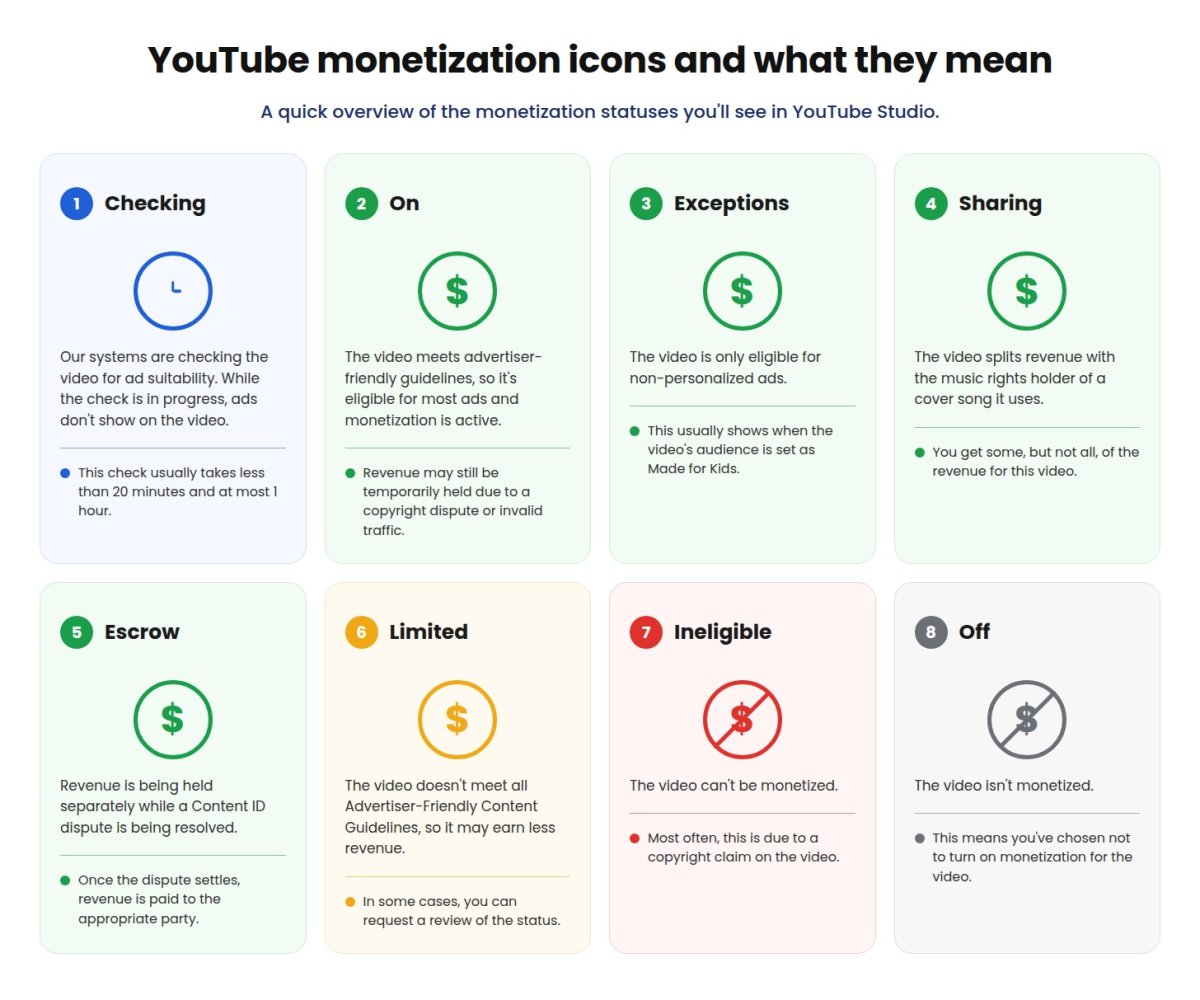
As a quick reference: the green states (On, Exceptions, Sharing, Escrow) mean the video does earn, though not always the full amount. Yellow (Limited) reduces earnings without removing them. Red (Ineligible) and gray (Off) mean the video is earning nothing right now. Ad suitability checks usually finish in under 20 minutes and take an hour at most, after which the icon settles on green, yellow, or red.
The table below covers the causes behind most restrictions, the icon each one tends to produce, and what to do in each case:
| Cause | Yellow vs red icon | How to prevent it | How to appeal |
|---|---|---|---|
| Strong language in the title, thumbnail, or across most of the video | Yellow for moderate profanity in a title or thumbnail, or focal use across most sentences; red for stronger profanity in a title or thumbnail, and for slurs anywhere | Keep the harshest words out of titles and thumbnails; occasional profanity spoken inside the video is usually fine | Request review if the automated system read occasional swearing as focal use |
| Violence or shocking footage without context | Yellow when educational or documentary framing is present; red when the video focuses on blood, gore, or injury with little context | Establish the news, educational, or documentary purpose in the title and description | Appeal by pointing to the informational purpose and where the context sits in the video |
| Sexual or highly suggestive content | Yellow for educational or artistic treatment; red for explicit acts, nudity, or sexualized thumbnails and titles | Avoid sexualized thumbnails and titles; keep an educational framing where the subject calls for one | Appeals rarely reverse explicit content, and videos edited in YouTube Studio are not eligible for re-review |
| Controversial issues (self-harm, abuse, suicide, eating disorders) handled without care | Yellow for artistic, educational, or documentary treatment; red for graphic depiction or for promoting the subject in content, title, or thumbnail | Keep the treatment non-graphic and leave out detail that could be imitated | Appeal by showing the preventive or educational angle of the video |
| AI content that should have been disclosed as altered or synthetic | Neither on its own; disclosure does not reduce earnings, but skipping it lets YouTube apply its own label and repeated failures put YPP membership at risk | Set “AI use” to Yes in the Attributes section when realistic content is generated or meaningfully altered | Correct the attribute in YouTube Studio rather than filing an appeal |
How does demonetization affect content creators?
If you face demonetization, this means that you will face ad revenue loss. Money the video already earned stays yours. If you don’t meet the platform’s rules, you may lose part of the income from future videos, and YouTube can exclude your channel from the Partner Program or disable ads across it where most of the content is unsuitable for advertisers or violations are repeated and serious. However, there’s always an option to appeal the decision.
How to not get demonetized on YouTube?
To avoid joining demonetized YouTube channels, follow these recommendations:
- Use neutral language and bleep out profanity;
- Avoid provocative topics;
- Don’t discuss conflicts, tragedies, and scandals without giving context;
- Don’t use other people’s content (music, videos, and images) without checking its copyright status first;
- Don’t publish erotic or provocative content;
- Don’t post misleading titles and previews;
- Monitor the channel’s design, since even the description and hashtags can affect it;
- Use Self-Certification during upload once your channel has access to it. Rating your own video against the advertiser-friendly content guidelines gives the system a clearer read on your content, and a consistently accurate history means YouTube starts trusting your rating over its own scans. Access usually arrives a month or two after you join the Partner Program;
- Comply with copyright standards and the laws of the region for which the video is intended;
- Upload content regularly (that is, your account must be active);
- Make sure your channel has 1,000 subscribers plus either 4,000 qualified public watch hours in the last 12 months or 10 million qualified Shorts views in the last 90 days. A separate 500-subscriber tier opens fan funding features such as memberships and Super Thanks, but not ad revenue.
For more details about YouTube demonetization rules, check the instructions from YouTube.
How to re-monetize YouTube videos after demonetization
If your video or channel has lost monetization, this is not a reason to despair. The fact is that you can get it back by filing an appeal. To do this:
- Sign in to YouTube Studio;
- Select Content in the left menu and go to the video you want to appeal;
- Hover over the status in the Notices column, where a “Limited ad earnings” or “No ad earnings” alert appears;
- Read the Impact summary hover card to see what triggered the restriction;
- Select the Action button to start the appeal. The option only shows if the video is eligible;
- Wait for the outcome by email. A policy specialist watches the video and reviews its content, title, and metadata against the advertiser-friendly content guidelines.
Also, don’t forget to check your YouTube demonetized channel for compliance with the platform’s policies:
- Review the video and trim controversial fragments in the YouTube Studio editor without re-uploading. Do this before you appeal rather than after, because a video edited in Studio to remove violative content is no longer eligible for re-review;
- Delete the video that violates the rules;
- Update the preview, description, and tags;
- Clean the channel from old questionable content;
- Check the AdSense settings and link the account correctly.
How to make more money on YouTube
Every content creator may face demonetized video or even channel, so you should know methods of making money on YouTube that will not leave you without a single cent.
Continuous live streams
The more followers you have, the more views you get, which, accordingly, increases YouTube monetization. One of the methods of earning money on the platform is 24/7 live streams of pre-recorded videos. This way, you can reach a larger audience and attract new subscribers without extra effort. Thanks to this, you will have the opportunity to advertise goods and services and use sponsorship options, subsequently boosting your income.
Setup no longer eats into the time you save. Gyre creates broadcasts on your channel through the YouTube API once you authorize it, so a stream goes live in under a minute. One setting is worth checking first: in YouTube Studio, under Settings → Monetization → Monetization defaults, switch on the option that applies your defaults to streams created on third-party tools. Leave it off and the stream starts with monetization disabled.
Invite subscribers to become channel sponsors
Your audience can sponsor your channel. This feature will allow you to earn monthly income and give your followers benefits such as exclusive content, early video access, chat badges, and more. Depending on your membership level, your subscribers will receive different benefit packs.
Advertise products and services
Advertising from third-party brands is also an excellent solution because you can get huge profits from this cooperation. Considering that people cannot miss such ads means more people will have to watch these integrations.
Take advantage of crowdfunding
Crowdfunding is a great way to build a community while funding content creation. Platforms like Patreon or Buy Me a Coffee allow your audience to pay monthly for exclusive content and perks. All you need to do is share the link to all your crowdfunding pages with your subscribers.
Key takeaways
Before you close this page, here’s what matters most about YouTube demonetization in 2026:
- Demonetization comes in two sizes: partial (yellow icon, limited ads) and total (red or gray icon, no ads).
- Inappropriate language, sensitive topics, violent or sexual content, and copyright issues account for most restrictions.
- Self-Certification at upload cuts your exposure to an automated misread.
- Any restriction can be appealed once. YouTube reviews with automated systems and, in many cases, a policy specialist.
- A well-argued appeal history builds credibility with the system, which starts weighting your own ratings more heavily.
Don’t worry: if your YouTube channel is demonetized, you still have four extra methods to earn money from other sources.
FAQ
What does the yellow icon mean on YouTube?
A yellow icon means limited ad earnings. Your video can still show ads, but fewer and lower-value ones. Limited is not the same as full demonetization.
How do I appeal a demonetization?
In YouTube Studio, open Content, hover over the status in the Notices column next to the affected video, then select the Action button. A policy specialist reviews the video, its title, and its metadata against the advertiser-friendly content guidelines.
Does strong language always demonetize a video?
No. Moderate profanity used inside a video can still earn ad revenue under the current guidelines. Restrictions kick in when that language dominates most sentences, appears in the title or thumbnail, or crosses into slurs and hate speech, which earn nothing anywhere.
What if I was demonetized unfairly?
File an appeal in YouTube Studio. Each video gets one, reviews take up to 7 days, and the specialist’s decision is final. Creators based in the European Union may have additional resolution options if they disagree with the rating.
Does disclosing AI-generated content hurt my monetization?
No. The “AI use” disclosure exists to inform viewers and doesn’t reduce your earnings on its own. Skipping it on realistic altered or synthetic content lets YouTube apply the label anyway, and a pattern of missing disclosures can put your Partner Program membership under review.
Does one demonetized video affect my whole channel?
Usually not. An ad suitability restriction applies to the individual video. YouTube reserves channel-level action for cases where the majority of your content is unsuitable for advertisers or where violations are repeated and serious.