14 min read

TL;DR
- Nightbot is still the free default and runs on Twitch, YouTube, Trovo, and SOOP, but Kick isn’t on that list.
- Fossabot is free and now covers Twitch, YouTube, and Kick, with the deepest spam and blocked-term filtering of the free options.
- StreamElements gives you a chatbot plus overlays, alerts, and loyalty points in one dashboard, across the same three platforms, though automatic bans and timeouts on Kick are still roadmap.
- Moobot and WizeBot remain Twitch-only. Streamer.bot is free, runs locally, and is the most programmable of the group.
- Botisimo has been offline since December 2023, so ignore the comparison lists that still recommend it.
- Platform-native moderation does more work than most creators realize: Twitch AutoMod, YouTube’s hold-for-review, and Kick’s chat modes and banned-word filters all run before any third-party bot sees a message.
- No mainstream free bot ships conversational AI in 2026. The AI that is real sits with the platforms and with a small group of purpose-built tools.
- On a 24/7 stream the bot isn’t an assistant, it’s your only presence in chat for most of the day.
What chatbots for streaming actually do
A streaming chatbot is a service that sits in your live chat with moderator permissions and acts on rules you set. It reads every message as it arrives, removes what breaks your rules, and answers the questions you’d otherwise type twenty times a night. Nothing about it is conversational by default. It’s a fast, tireless rule engine.
Most bots cover the same four jobs: filtering messages, responding to commands, posting on a timer, and running interactive extras like polls, giveaways, or song requests. The differences that matter are which platforms a bot supports, how granular its filters get, and how much control your mod team has without you.
Why streamers need chatbots
The honest reason is arithmetic. You can host a show or you can watch chat, and doing both well at the same time isn’t realistic past a few dozen concurrent viewers.
- Chat management: deleting spam, offensive messages, and scam links. That’s the same layer that protects you when things get organized and hostile, and our guide on how to deal with trolls and negative comments covers the protocol side.
- Engagement: polls, giveaways, and loyalty mechanics that give lurkers a reason to type something.
- Time: greeting new chatters, posting your socials, and answering “what mic is that” without you touching the keyboard.
- Records: searchable chat logs and audit trails, so you can see why a message was removed and who removed it.
What to look for in a chatbot in 2026
Platform coverage comes first, because it eliminates most of the list before you compare anything else. A bot that doesn’t support your platform has no features at all, and Kick in particular splits the field: it’s the one place where the most popular free bot simply isn’t available.
After that, weigh moderation depth against convenience. Cloud bots like Nightbot, Fossabot, StreamElements, and Moobot need no install and stay online when your PC doesn’t. Local tools like Streamer.bot trade that for automation you can’t get anywhere else, including direct OBS control from chat. If you run a mod team, look for audit logs and role-based permissions rather than a single shared password to everything.
Best chatbots for streaming in 2026
Six tools are worth your time this year. The table compares what each one covers; the notes below explain who each is actually for.
| Chatbot | Platforms | Key strengths | Cost |
|---|---|---|---|
| Nightbot | Twitch, YouTube, Trovo, SOOP | Commands, timers, spam filters, song requests, searchable chat logs | Free |
| StreamElements | Twitch, YouTube, Kick | Bot plus overlays, alerts, loyalty points, and tipping in one dashboard | Free |
| Fossabot | Twitch, YouTube, Kick | Best-in-class spam filters, blocked-term engine, audit logs, custom mod roles | Free |
| Moobot | Twitch | Auto-moderation with sub exemptions, built-in commands, granular mod permissions | Free, optional Moobot Plus |
| WizeBot | Twitch | Channel-point automations, currency and shop, games, AI end-of-stream recap | Free, optional premium |
| Streamer.bot | Twitch, YouTube, Kick | Local automation: triggers, OBS scene control, unlimited custom logic | Free |
Nightbot
Most streamers meet Nightbot first, and it earns that position by being genuinely simple: sign in, click Join, add filters, done. Its own documentation lists support for Twitch, YouTube, Trovo, and SOOP, along with capitalization, link, symbol, and blacklist filters that cover ordinary spam without configuration. Analytics stay shallow and customization runs out faster than with Fossabot, but for a channel under a few hundred viewers that ceiling rarely gets hit. The gap that does hurt in 2026 is Kick.
StreamElements
StreamElements isn’t really a chatbot; it’s a creator suite with a chatbot inside it. Overlays, alerts, a tipping page, and a loyalty-points store all live in one dashboard, which is why so many established channels have an account whether they use the bot or not. Its help center documents the bot on Twitch, YouTube, and Kick, where automatic moderation actions are still on the roadmap. Pick it for one login covering everything; skip it if all you need is chat.
Fossabot
Fossabot is the moderation specialist, and the strongest free option for a channel with a real mod team. It’s cloud-hosted and free on all three of Twitch, YouTube, and Kick, with a blocked-terms engine, audit logs on every moderator action, and role-based access so trainees don’t get the keys to everything. The dashboard updates in real time, which matters when two mods are working the same raid. If keeping chat clean is the deciding factor, this is the pick.
Moobot
Moobot has been a Twitch fixture for well over a decade and asks nothing of you: no payment, no download, no separate registration. Its strength is the fine detail in how it handles automatic moderation: relaxed rules for subscribers, permitted links and quotes, and per-mod permission groups. The limitation is absolute: Twitch and nothing else. For a Twitch-only channel that wants sensible defaults out of the box, that’s not much of a limitation.
WizeBot
WizeBot is also Twitch-only, but it goes wide instead of deep on moderation. Channel-point rewards with automatic actions, a virtual currency and shop, bets, bingos, leaderboards, and an AI-generated recap in your end-of-stream credits all come from one dashboard. It’s the most feature-dense of the Twitch-only options, and the least minimal. Beginners often find the settings tree overwhelming before they find the feature they wanted.
Streamer.bot
Streamer.bot is the outlier: a free Windows application rather than a cloud service, built for people who want to wire chat into everything else. Commands are platform-agnostic across every platform it connects to, and actions can switch OBS scenes, fire sounds, hit APIs, or chain into other tools. The cost is your machine staying on and a genuine learning curve. Experienced streamers love it; nobody should make it their first bot.
One name to strike from your shortlist: Botisimo. Its chatbot and sponsorship programs were discontinued at the start of December 2023, and the service has stayed offline since, yet it still appears in “best multi-platform bot” roundups written years after it went dark.
AI moderation in 2026: what’s real and what’s marketing
The phrase “AI moderation” gets attached to almost anything now, so it’s worth separating the layers. The most capable AI in your chat isn’t a bot you installed. It’s the platform itself, running before third-party tools ever see a message.
On Twitch, that’s AutoMod. Twitch’s own documentation describes it as an automated system that withholds risky messages until a moderator approves or denies them, filtering categories such as aggression, bullying, swearing, sexual content, and identity-based hate at levels 0 through 4. It never bans or times anyone out by itself, which is exactly why pairing it with a bot matters.
YouTube takes the same approach with different words. You can opt in to have YouTube hold potentially inappropriate live chat messages at a Basic or Strict threshold, keep a blocked-words list, and restrict chat to subscribers or slow mode, all from the live chat moderation settings.
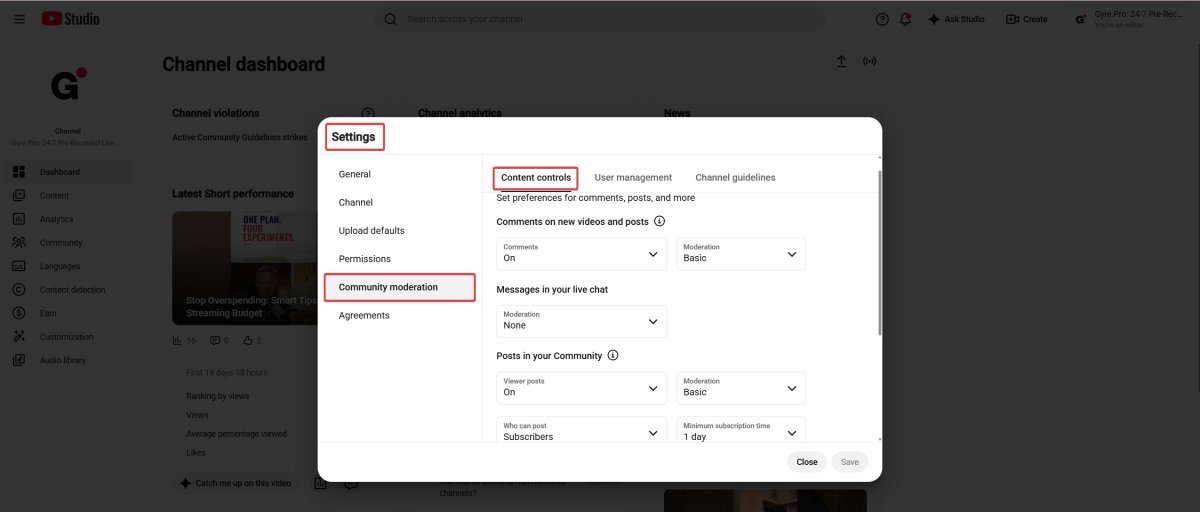
YouTube’s newer AI features are aimed at comprehension rather than enforcement. New viewers may see an AI-generated summary of the chat, which is still experimental and can be disabled per stream, and messages in other languages are translated automatically for creators and moderators. Kick, meanwhile, keeps its moderation in a dedicated Mod Dashboard: chat modes, an account-age minimum, and banned-word filters that mods can switch on mid-stream.
Third-party AI bots do exist, mostly on Twitch and Kick, and they work differently from keyword filters: they weigh intent and context, so sarcasm and in-jokes are less likely to trigger a timeout. What none of the mainstream free bots offer in 2026 is a conversational AI personality: the big free four all stay rule-based. Treat “AI-powered” as a claim to test on your own chat for a week, not a feature you can compare on a spec sheet.
How to choose by platform and channel size
Start with where you broadcast. On Twitch you have every option, so choose by temperament: Fossabot for moderation depth, Moobot for sane defaults, WizeBot for channel-point mechanics, Streamer.bot for automation. If you’re still setting the channel up, our beginner’s guide to streaming on Twitch covers the parts that come before chat.
On YouTube Live, Nightbot, StreamElements, Fossabot, and Streamer.bot all work. On Kick the shortlist is Fossabot, StreamElements, and Streamer.bot, with one caveat worth knowing: Streamer.bot receives Kick events through webhooks rather than a websocket, so triggers can arrive late. Don’t build anything time-critical on it. Kick’s growing share of live viewers is part of why this matters, and we compared it with the rest in our roundup of YouTube alternatives for live streaming.
If you broadcast to several platforms at once, the calculation changes: one bot covering all three beats three bots with three command lists that drift apart within a month. Fossabot and StreamElements are the practical answers, and the same logic applies to the broadcast itself. See how to live stream to multiple platforms for the encoder side.
Channel size decides how much of the bot you actually turn on. Under a hundred concurrent viewers, default filters plus three or four commands is the whole job. Once a mod team appears, audit logs and per-mod permissions stop being nice-to-have. Above a few thousand concurrent, expect to run strict platform-side thresholds and a bot on top, and to revisit both after every raid that goes badly.
Getting more out of your chatbot
Setup is an evening; the value comes from what you do in the following weeks. Check the bot’s analytics for which commands people actually use, and delete the ones nobody triggers. A bloated command list makes the useful ones invisible. Rotate your timers rather than repeating one message all night, and keep them tied to something real: a schedule, a current playlist, a link people ask for.
Test every filter change on a quiet stream before a big one, because an over-tuned filter that eats normal messages costs you more engagement than the spam it stops. Timing helps too: knowing when your audience is actually around tells you when tighter moderation is worth it, and our notes on choosing the best time to go live are a reasonable starting point.
Chatbots for 24/7 streams
Everything above assumes you’re somewhere near the keyboard. Continuous streams break that assumption completely. Running pre-recorded video as a 24/7 live stream with a tool like Gyre keeps chat open around the clock on YouTube, Twitch, and Kick, while you’re asleep, at work, or filming something else. There are no mods online at 4 a.m., and the bot is the entire moderation team.
That changes what you configure. Filters should run stricter than they would on a hosted stream, because nobody is there to approve a false positive. Link permissions matter more, since an unattended chat is exactly what link spammers look for. And your commands should answer the questions a 24/7 audience actually asks: what’s playing, whether this is live or recorded, where to find the full video, and when you’re next on camera.
Key Takeaways
- Filter by platform first, then by moderation depth. Everything else is preference.
- Turn on the platform’s own tools before adding a bot, then set the bot to handle what the platform deliberately leaves to you: bans, timeouts, and clearing the review queue.
- Start with defaults and three commands. Add the fourth only when someone asks the same question twice.
- Re-check your shortlist once a year. Botisimo is proof that a recommended tool can be gone for two years while the articles recommending it stay up.
- If your channel runs continuously, configure the bot for an empty room rather than a full one—stricter filters, tighter link rules, and messages that don’t pretend you’re watching.
FAQ
What is the best free chatbot for streaming?
Nightbot for simplicity, Fossabot for moderation. The first handles commands, timers, spam filters, and giveaways with about five minutes of setup. Fossabot is also free, works on Kick as well, and gives you far more filtering control plus audit logs.
What’s the difference between Nightbot and StreamElements?
Nightbot is a standalone chatbot. StreamElements is a creator platform that includes a chatbot alongside overlays, alerts, tipping, and a loyalty-points store. If you only need chat handled, Nightbot is less to manage; if you want one dashboard for the whole stream setup, StreamElements does more.
Do chatbots work on YouTube Live?
Yes. Nightbot, StreamElements, Fossabot, and Streamer.bot all support YouTube Live. You link your YouTube account, let the bot join your channel, and grant it moderator permissions in YouTube Studio.
Which chatbots work on Kick?
Fossabot, StreamElements, and Streamer.bot. Nightbot has no Kick support and none announced, which makes it the notable absence. StreamElements covers commands and alerts on Kick but can’t yet time out or ban chatters there automatically, so Fossabot is the safer pick when moderation is the priority.
Do I need a chatbot for a 24/7 stream?
More than on a normal stream. A continuous broadcast means chat is live when you aren’t, so filters, link rules, and automatic responses carry the whole load while nobody is watching. Set them stricter than you would for a hosted stream.
Can a chatbot moderate chat with AI in 2026?
Partly. Twitch AutoMod has used machine learning for years and YouTube holds flagged messages for review, but both hand the final decision to a human. Purpose-built AI bots that read intent rather than keywords exist for Twitch and Kick, while the mainstream free bots stay rule-based.