15 min read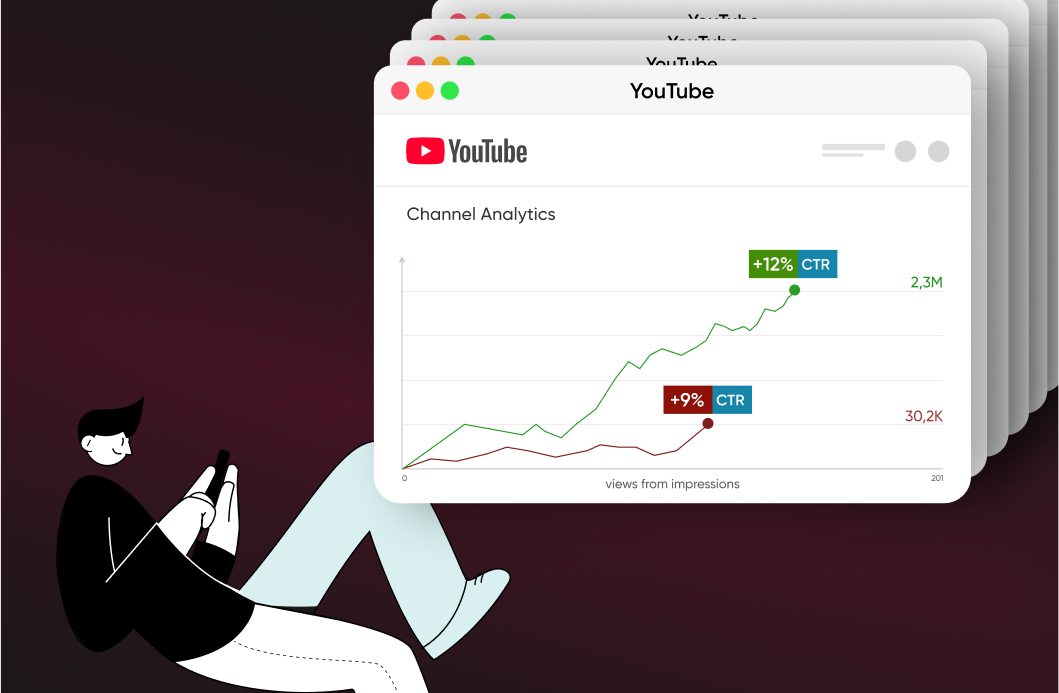

TL;DR
- CTR (click-through rate) is clicks divided by impressions. YouTube's own benchmark puts half of all channels and videos between 2% and 10%, with 4-6% considered average and 10%+ excellent.
- A high CTR comes from the thumbnail and title working together. A striking thumbnail with a mismatched title still underperforms.
- Test & Compare, YouTube's native A/B testing tool, now lets creators test up to three thumbnails, titles, or combined packages on the same video, and picks a winner by watch time per impression, not raw CTR.
- The first 100-150 characters of your description appear in search results and suggested feeds before viewers hit "Show more," so front-loading a keyword and a clear hook there can influence clicks.
- AI tools like Canva's Magic Media and Adobe Firefly speed up thumbnail production, but contrast, a clear focal point, and an honest match to the title still decide whether a thumbnail converts.
Remember the most basic truth: YouTube's goal is to keep users on the platform for as long as possible. When a video performs well, YouTube shows it to more new viewers. A high CTR signals to YouTube that viewers are choosing to watch your video, which means it should be featured more often on the home screen, sidebar, or in search results.
The percentage of CTR depends on the clickability of the video thumbnail and title. If women love with their ears, YouTubers love with their eyes. It is extremely important to make the thumbnail both aesthetically appealing and understandable, because this drives the majority of a video's CTR.
The Unwritten Rules of YouTube
Before we start delving into this article's main topic, we want to offer a few YouTuber rules:
- Do not believe that there are magical instructions with working formulas to gain millions of views.
Don't waste your time on conspiracy theories. Keep calm and keep creating content.
- For a viewer to watch your video, they must first find it and decide to watch it.
Sounds like Captain Obvious, but this rule is critical to remember because 720,000 hours of video are uploaded to the platform every day on YouTube worldwide (data from Tubefilter, 2019). It would take 82 years to watch these videos uploaded in just 1 day.
With so much video content on the platform, it's important to make your content stand out, so it breaks through and finds an audience.
- Look at your content through the eyes of a viewer.
Of course, it's hard to keep an open mind when evaluating your own work. But you are creating a product for an audience, which means you need to consider the logic and criteria for choosing the content for your target audience.
Let's do a little experiment
Imagine that you want to buy a sweet and juicy watermelon. But what's the best way to choose a good one? Let's turn to YouTube for answers.
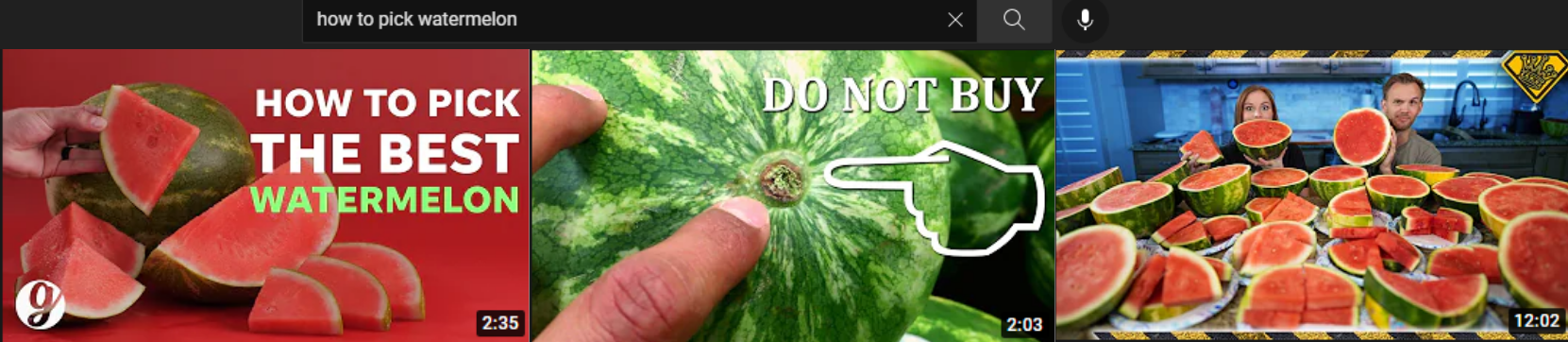
Here we see the first three results. We deliberately left only the visual component. The decision to watch/not watch takes a few seconds and is often based on the aesthetic appeal of the image to the user.
The first image contains bright contrasting colors and readable, concise text. There's no visual noise or distracting objects in the background. The author created an organic thumbnail with attractive slices, as if hinting that "after watching the video, the viewer will be able to choose the same ripe and appetizing watermelon." It's worth noting that the text on the thumbnail precisely reflects the key query in the search bar. Thus, the author simultaneously completes two tasks: 1) creating a distinctive thumbnail and saving viewers time by helping them quickly "decipher" it; 2) helping the content to be better understood by algorithms and signaling that the content is relevant, useful, and should be recommended to platform users.
The author of the second video used an image with the opposite message. The thumbnail contains advice that it is not worth buying a watermelon with such a tail, and the reason is apparently explained in the video. The thumbnail creates intrigue and fuels the viewer's interest, stimulating them to watch the video. The picture itself is effective and informative. There are no distracting details. The absence of unnecessary noise in the photo is not only about aesthetics. There's a single message for the user, which is wise, as the author has only a few seconds to hook the viewer with a thumbnail message about the relevance of the content.
The third video's thumbnail is the least helpful. We don't know the content of this video. Maybe there is relevant and useful content, but the lack of a clear video content message on the thumbnail minimizes the chances of getting views. It's difficult to predict whether the viewer will receive an answer to their question from this picture. The duration of this particular video also doesn't help. If the user chooses from a list of recommendations based solely on thumbnails, there's a possibility that the content of the thumbnail will be misinterpreted. The author will no longer have a chance to convince the viewer that their content is useful.
Now let's look at these same videos' titles.
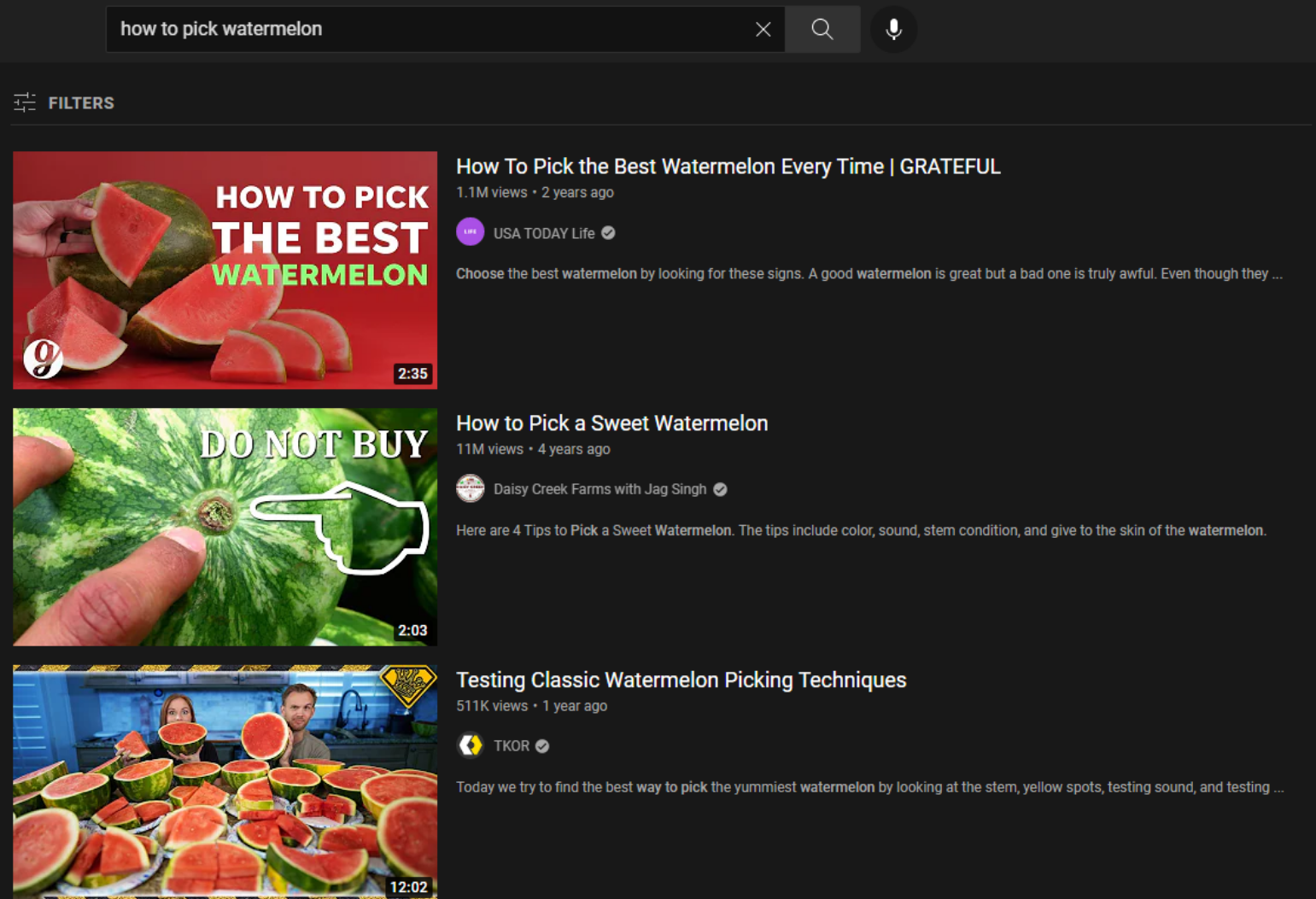
The puzzle has been completed. The titles of the first two videos precisely reflect the user's key query in the search bar. As for the third video, we understand that it is also relevant thanks to the title. But the first two thumbnails are full-fledged messages for the user, and the last one requires a title.
The experiment results and thumbnail analysis
CTR is a click-through rate that depends on the thumbnail and title of the video. Before creating thumbnails for your channel, it's worth practicing the skill of analyzing existing thumbnails from the audience's point of view. Analyzing other people's thumbnails is unbiased and more objective, so we took existing videos on YouTube as an example.
Thumbnail analysis:
- Scene recognition of the thumbnail.
By looking at the thumbnail, you can describe a specific message, plot, or key components, including
- Arousing interest or intrigue
- Having a focal point
It can be one or more elements that attract the eye.
What Is The Click-Through Rate (CTR) on YouTube?
CTR is the percentage of impressions that turn into clicks on a video. For example, if your video was shown 100 times and only 5 users clicked on it, your CTR would be 5%. Once YouTube sees that you are getting thousands of clicks, it will want to recommend your content and expand your target audience. If the distinction between an impression and a view still feels blurry, this explainer on YouTube impressions walks through exactly how YouTube counts each one and why a high impression count with a weak CTR usually points to the thumbnail, not the algorithm.
In YouTube Studio's Reach tab, you can see the number of thumbnail impressions and watch time. As an illustration: out of 19.5 million impressions, one video received 2.3 million views with a CTR of 11.6%, well above the platform average.
Users "read" the message from the thumbnail and made their choice in favor of viewing the content. Again, we want to emphasize the importance of the thumbnail.
The CTR metric itself sits near the top of the Reach tab, which reflects how important the metric is for YouTube's systems. Impressions turn into views, and views feed into recommendations, largely through CTR. CTR is only one piece of the dashboard, though: this complete guide to YouTube analytics covers where it sits alongside watch time and retention, and how to read all three together.
YouTube click-through rate provides useful information about the performance of the video title, thumbnail, and text description. It is worth adding that the percentage of CTR is also affected by the subject of the video, more precisely, its popularity and relevance. In addition, we do not recommend comparing your CTR and the CTR of other creators' videos, even in the same niche. In this case, CTR will be affected by many factors, including the target audience, engagement, average viewer retention time, geo, and so on.
Also, CTR can differ by traffic source: search, suggested videos, and the YouTube home page each pull a different kind of audience, so the same video can score differently across them. There's a broader mechanism behind why CTR shifts as a video ages, covered in more detail further down.
How to Know Your CTR for YouTube Videos
To find out a video's click-through rate on YouTube, you need to:
- Go to YouTube Studio;
- In the left menu, select the "Analytics" section and then go to the "Reach" tab.
Here, you'll be able to check the following data:
- Impressions;
- Impressions click-through rate;
- Number of views;
- Watch time.
It's important to note that the CTR indicator is displayed as a percentage and shows how many viewers clicked on your thumbnail after seeing it.
What Is a Good Click-Through Rate on YouTube?
There's no single answer to the question "What is considered a good click-through rate on YouTube?" it depends on such aspects as:
- The topic of your content;
- Its target audience and its geography;
- Traffic sources;
- The scale and age of your channel.
According to YouTube's own Help Center, half of all channels and videos on the platform sit somewhere between 2% and 10% impressions CTR. Within that range, 4-6% is generally considered average, and anything above 10% is excellent. In practice, everything can be somewhat more complicated: an 8% CTR that looks strong for an educational channel could be unremarkable for a new entertainment channel chasing viral reach, while a 4% CTR isn't a death sentence for a channel with a million subscribers, since its wide coverage plays the main role there.
This leads to a very logical conclusion: you shouldn't compare your CTR with other channels, even in the same niche. It's much wiser to track your own videos over time to see how your channel's packaging is trending.
Thumbnail Best Practices: Common Mistakes vs. What Actually Works
Most low-CTR thumbnails fail for a handful of repeatable reasons. Here's a quick reference before you design your next one.
| Thumbnail element | Common mistake | Best practice for CTR |
|---|---|---|
| Text overlay | Long sentences or more than one message crammed into the frame | 3-5 large, high-contrast words that add to the title instead of repeating it |
| Color and contrast | Colors that blend into YouTube's white and dark interface | Bold, contrasting colors and a single visual accent that stands out in a feed |
| Focal point | No clear subject, or several competing focal points | One dominant focal point, often an expressive face, that reads clearly at small size |
| Composition | Cluttered background with distracting objects or text | A clean, uncluttered frame with negative space around the main subject |
| Title match | A thumbnail that promises something the video doesn't deliver | A thumbnail and title that make the same promise, so retention holds up after the click |
| Resolution | Uploading a thumbnail below 1280x720 | High-resolution images; anything under 720p gets downscaled to 480p during A/B tests |
How to Increase YouTube СTR
If you don't want to settle for the average CTR for YouTube videos and wish to maximize the clickability of your videos, use the following recommendations.
Create attractive thumbnails
To make thumbnails look attractive, use contrasting colors and large fonts, but avoid overloading (just choose one visual accent). Also, try to convey emotion or intrigue, both through text and through an image. Color choice isn't just decoration either: red tends to read as urgency, yellow as energy, and blue as trust, so the palette you pick can shift how a thumbnail feels before a viewer even processes the text.
AI tools have sped this step up quite a bit. Canva's Magic Media turns a short text description into thumbnail concepts, and Adobe Firefly can generate a background or base image that you finish with your own text and layout. What neither tool does for you is judgment: someone still has to pick the concept, tighten the contrast, and check that the final result reads clearly at thumbnail size. If you want a fuller comparison of the tools creators actually reach for, including where AI-generated thumbnails help and where they fall flat, see this breakdown of AI thumbnails on YouTube in 2026. One thing worth keeping in mind if you run a 24/7 pre-recorded stream through a tool like Gyre: your thumbnail has to stay recognizable across every replay, not just look good once, and this guide to designing thumbnails for live streams covers that angle specifically, so a distinctive style pays off more than a one-off AI generation would.
Come up with catchy titles
To do this, you have to include keywords and a promise of value for the end viewer in the titles. It's also important to hold attention through the titles: numbers, intriguing words, as well as their emotional coloring will help you with this. At the same time, you should maintain a balance and don't mislead your audience, otherwise it will be perceived as deception, which will ultimately reduce retention. Title strategy rarely works in isolation from the rest of your channel SEO, so if you haven't audited the other metadata around it recently, this guide to optimizing a YouTube channel for growth is a useful next stop.
Analyze traffic sources
Check where your CTR is higher: this can be search, suggested videos, or the home page. In fact, you can get valuable insights from here to improve your strategy and, in particular, to subsequently adapt the design of your videos to specific sources.
Test & Compare: A/B test your thumbnails and titles
YouTube's native A/B testing tool, Test & Compare, now covers thumbnails, titles, or a combined title-and-thumbnail package in a single test: creators can upload up to three variants and let real viewer behavior pick the winner. The feature is available to any creator with Advanced Features enabled in YouTube Studio, no Partner Program membership required, though it currently runs on desktop only and isn't available for Shorts, scheduled Premieres, or videos marked Made for Kids or age-restricted.
Here's the part that surprises most creators: YouTube decides the winner by watch time per impression, not by raw click-through rate. A thumbnail or title that wins clicks but loses viewers within seconds won't come out on top, which pushes creators toward honest, accurate packaging instead of pure clickbait. That's the same metric behind YouTube's broader ranking logic; this look at average view duration and watch time gets into why the platform leans on it so heavily. Tests typically need a few thousand impressions per variant and can run up to two weeks before YouTube declares a winner, reports the options performed the same, or marks the result inconclusive. For a full walkthrough of setup, eligibility, and how to read the report, see Gyre's guide to YouTube's title and thumbnail A/B testing tool.
Optimize your description's opening lines
The thumbnail and title get the first look, but your description plays a role too. YouTube shows roughly the first 100-150 characters of a description in search results and suggested-video feeds before a viewer has to tap "Show more." That visible portion works like a search snippet: front-load your primary keyword and a one-sentence hook that matches what the thumbnail and title already promised, then use the rest of the description for timestamps, links, and supporting keywords. A description that contradicts the thumbnail's promise undercuts the click you just earned, so keep the message consistent across all three elements.
Publish your videos during peak hours
CTR is usually higher in the first hours after publishing, so you'll need to create a schedule for uploading new videos according to the time zone of your target audience.
Use analytics
Finally, don't forget to track CTR and engagement. So, if the CTR is below 2%, you should definitely reconsider the title and thumbnail for the videos in question.
The impact of CTR on YouTube video ratings in search results
In our last article, we talked about optimizing existing content with the goal to reindex the videos. The point is to let the YouTube algorithms know that the video is still relevant and useful. Detailed mechanics are described in that article.
CTR isn't just a report card, it's an input YouTube's systems use to decide how far a video travels. Before pushing any upload widely, the platform tests it in front of a small sample of viewers first. If that sample clicks and watches at a strong rate, YouTube widens distribution: more impressions on the homepage, more slots in suggested videos, more visibility in search. If the sample doesn't respond, reach stays capped at that small pool, regardless of how good the video itself is. That's the actual bridge: CTR at the testing stage is the signal that unlocks (or blocks) everything that comes after.
One counterintuitive part of this mechanism is that CTR usually falls as a video's reach grows, and that's normal rather than a warning sign. Early impressions tend to come from subscribers and viewers who already know the channel, a warm audience that clicks readily. As a video earns more impressions and starts reaching colder, less familiar audiences through suggested videos and the homepage, CTR naturally settles lower, even while total views keep climbing. A video going from a 9% CTR on 10,000 impressions to 3.5% on 100,000 impressions a week later isn't losing steam; it has moved past its original audience and is being tested on a much wider one. Traffic source matters here too: the same video can show a higher CTR in search, where viewers already have intent, than on the homepage, where they're browsing cold.
The practical takeaway is that the bridge runs in both directions. A weak CTR at the small-sample stage caps a video's reach before it ever gets in front of a broader audience, since there's no signal to justify expanding distribution. A strong one keeps the door open, impression pool after impression pool, until the video reaches its ceiling for that topic and audience. That's why the thumbnail and title work covered above matters most in the first few hours after publishing, before subscribers and regular viewers give way to the colder audiences that decide whether a video keeps climbing.
Working with a thumbnail is not as time-consuming and costly as creating high-quality video material. Still, whether an upload gets tested on a wider audience at all depends on that early click-through signal, which makes the packaging work worth doing before a video goes live, not after it stalls.
The main thing is not only to create new videos but also to optimize existing content. Make it a rule to optimize a handful of existing videos per week, and you will notice positive changes in the channel statistics.
Key Takeaways
- A high CTR comes from thumbnail and title working together. One great thumbnail with a mismatched title still fails.
- Big, high-contrast text (3-5 words) and a clear emotional focal point drive the most clicks.
- The first two lines of your description appear in search and influence clicks, so front-load keywords and your strongest hook.
- Use YouTube's Test & Compare to A/B test up to three thumbnails or titles and let the data, not a guess, pick the winner.
- Honest thumbnails beat clickbait long-term. A mismatch between what a thumbnail promises and what the video delivers tanks retention and hurts how the algorithm treats the video afterward.
FAQ
What is a good CTR on YouTube?
Most videos see 2-10% CTR. Below 2% means your thumbnail or title needs work; above 6% is strong. Always compare within your own niche and channel history rather than against other creators.
How do I make a thumbnail with high CTR?
Use big, high-contrast text (3-5 words), a clear emotional focal point (often a face), strong color contrast against the feed, and make sure the thumbnail matches your title's promise.
Does the description affect CTR?
Yes. The first 100-150 characters appear in search results and suggested feeds. Front-loading a compelling, keyword-rich hook there can increase clicks from those surfaces.
Can I test different thumbnails?
Yes. YouTube's Test & Compare feature lets you A/B test up to three thumbnails, titles, or combined packages on the same video, and it picks the winner based on watch time per impression rather than CTR alone.