10 min read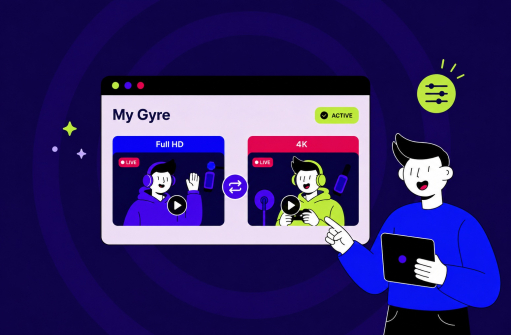

TL;DR
- Your plan gives you capacity, not separate limits for Full HD or 4K.
- Each stream uses a share of that capacity: more for 4K, less for Full HD.
- How you split it is your call, and you can change the split daily within your subscription.
- If you already have an active 4K Gyre plan, it remains active as long as you keep paying.
A builder instead of a fixed grid
After working with thousands of Gyre users, one thing is clear: no single 24/7 streaming setup fits every creator.
Some channels need several parallel streams across different niches. Others want one stream at the highest quality, another rewrites their strategy every week to keep up with new trends.
A fixed grid can't keep up. So Gyre no longer decides for you how many streams to buy, or at what quality. You pick the capacity. What you do with it is up to you.
How the new Gyre plans work
Think of a Gyre subscription like storage on your phone. You get a total amount, and what you fill it with (high-resolution photos or a stack of lightweight documents) is your choice.
Gyre works the same way. Each stream uses a portion of your capacity: Full HD takes one slot, 4K takes four. Your plan sets how many slots you have. How you spend them is up to you.
| Plan | Capacity | Example use |
|---|---|---|
| Free Trial | 1 slot | One Full HD stream |
| Start | 1 slot | One Full HD stream |
| Start+ | 4 slots | Four Full HD streams or one in 4K |
| Pro+ | 8 slots | Eight Full HD streams, two in 4K, or any mix |
Maximum quality requires 4 slots, so 4K is available starting with Start+. On Free Trial and Start, you always run one Full HD stream.
See the full list of plans and capacities on the Gyre pricing page.
What changes inside the Gyre platform
The interface stays as simple as the description above: one free-capacity indicator instead of separate counters for each quality. Open the dashboard and you see how much room you have and what fits. The indicator updates on its own the moment you launch or stop a stream, no page reload needed.
Error messages are clearer too. Before, the system just said "no free slots" no matter what actually happened. Now it tells you the specifics: for example, that maximum quality needs 4 free slots, and only 3 are available, and that stopping one stream (or launching this one in Full HD) will fix it. You always see the exact reason and a fast way out.
What you get
You can change your setup without penalty. Ran a few streams across different niches today, and tomorrow, want to pool everything into one max-quality stream? Go ahead. The capacity stays the same. You just spread it however works best for your channel.
There are no restrictions on combinations. Running one stream at the highest quality alongside several lighter ones is as valid as running eight identical ones. If you need more capacity, upgrade or add an extra subscription.
Revenue depends on your channel, your niche, and how you allocate resources. You can estimate a rough number in under a minute.
Transition period
If you're on a 4K plan, nothing changes abruptly. Your plan stays active as long as payments go through as usual. You don't need to do anything on your end. Your plan ends if:
- You cancel the subscription yourself.
- A payment fails. We try to charge up to 3 times and send email reminders in advance. For annual plans, we send them 10 days before renewal; for other plans, 3 days out. If the payment still doesn't go through, the subscription closes.
- You switch to a different plan. Once you switch, the old 4K plan isn't available to buy again.
In all three cases, new 4K access opens through the updated capacity model.
Real-world results
Over 15,000 creators are increasing retention and revenue right now with 24/7 streaming from Gyre. Here are some of the strongest stories.
Time to test it
The new capacity model is already live in Gyre. Split it however works for you, with no separate limits per quality.
See how Gyre works in practice: first 7 days free.
FAQ
What is a slot?
A unit that measures server resources. A Full HD stream uses one slot, 4K uses four. Your plan determines the total number of slots available to you.
Can I run streams at different qualities simultaneously?
Yes. If your plan has enough capacity, you can mix them. For example, one stream at maximum quality plus a few lighter ones on Pro+.
What happens to my old 4K plan?
It runs unchanged as long as you keep paying for it. If payments stop, you won't be able to buy that specific plan again.
Are the plan names changing?
No. Only how capacity is calculated for streams of different qualities is changing.