14 min read

TL;DR
- Since August 24, 2026, YouTube counts a view the moment playback starts, across long-form video, Shorts, and live streams. Public view counts went up; Partner Program math did not move.
- Earnings still run on engaged Shorts views and engaged watch hours, and eligibility on qualified Shorts views and qualified watch hours.
- In July 2026 YouTube rewrote its monetization policy into three named categories: generic or repetitive content, unsatisfying or off-putting content, and AI personas on sensitive topics.
- AI-assisted video is still monetizable when your own idea drives it. Templates run at scale are not.
- A cap on how many live streams one channel can run at once is rolling out. The notice went out in February 2026, and enforcement has reached channels unevenly ever since.
- Live Practice Mode is rolling out in the mobile app: a private rehearsal space you can go live from directly.
- Custom Shorts thumbnails upload from YouTube Studio on desktop, at 9:16, on verified accounts.
- Channel membership prices moved to recommended, exchange-rate-based rates after June 2026. Existing members keep what they pay; new members pay the updated price.
- Two September dates: Studio mobile app 24.31.6 and below stop working on September 9, and paid product placements become the Branded Content Policy.
What changed on YouTube in summer 2026
Five changes with practical consequences, plus two deadlines that land in September. Three of them touch measurement and money, two touch the tools you work in every day, and none of them require you to change what your channel is about.
| Update | What changed | Who feels it | First move |
|---|---|---|---|
| View counting, August 24, 2026 | A view counts from the first frame on every format, live streams included | Every channel, and continuous streams most of all | Rebuild period comparisons on engaged views and engaged watch hours |
| Monetization policy, July 2026 | One vague rule split into three named categories with examples | Template-driven channels and AI-assisted production | Watch your last ten uploads back to back and see whether they blur together |
| Concurrent live streams, rolling out since February 2026 | A cap on how many streams one channel or one stream key can run at once | Multi-stream and 24/7 channels | Group thin streams by theme before the cap reaches your channel |
| Shorts thumbnails | Custom 9:16 uploads from desktop Studio, plus thumbnail generation in Ask Studio | Anyone whose Shorts get found outside the feed | Add thumbnails to your best-performing older Shorts first |
| Membership pricing, after June 2026 | Recommended prices based on current exchange rates, set per level in Studio | Creators with members outside the US | Open Earn → Memberships and decide before the 60-day window closes |
| Studio mobile app, September 9, 2026 | Versions 24.31.6 and below lose support | Anyone managing a channel from a phone | Update the app |
| Branded content, September 2026 | Paid product placements become the Branded Content Policy, with geo and age controls | Sponsored content of any size | Check the paid promotion settings on your next brand deal |
Views now start counting from the first frame
Since August 24, 2026, YouTube counts a view the moment a video starts to play, with no minimum watch time, across long-form video, Shorts, and live streams. The stricter old definition survives in Analytics under the name engaged views, which excludes replays and viewers who left in the opening seconds. Both numbers are documented on YouTube’s help page on content performance.
Nothing about payment changed. Partner Program earnings still come from engaged Shorts views and engaged watch hours, and eligibility still runs on qualified Shorts views and qualified watch hours, so an inflated public counter feeds neither. What did change is every ratio with views in the denominator: likes per view, comments per view, and subscribers per view all dropped on the same day, on channels that published nothing unusual.
Continuous live streams feel this more than uploads do. A 24/7 broadcast collects a new view each time someone opens it, including the people who land on it, watch four seconds, and leave, so the counter on a long-running stream climbs faster than it did in July. Our breakdown of why YouTube metrics drop and how to diagnose the cause covers how to separate a counting artifact from an actual decline. Short-form went through the same shift in March 2025, and what the Shorts view count update did to creator analytics is the closest thing to a rehearsal for reading these numbers.
The monetization policy now names three kinds of content it won’t pay for
In July 2026 YouTube rewrote the guidance that used to sit under one heading about repetitive content. The channel monetization policies page now lists three separate categories, each with its own examples: generic or repetitive content, unsatisfying or off-putting content, and AI personas related to sensitive topics. The reused content policy sits beside them, unchanged.
Generic or repetitive content covers videos that look made from a template, or that feel interchangeable after a viewer watches several from the same channel in a row. Unsatisfying or off-putting content is aimed at emotionally manipulative formulas, clips assembled for shock with no narrative running through them, and deceptive imagery such as a realistic fake disaster. The third category is narrower and blunter: an AI persona presenting itself as a human expert on health, law, finance, or politics cannot monetize, whatever the quality of the advice.
The rules themselves did not tighten. The wording did, and enforcement follows wording. YouTube is explicit that AI tools are welcome in the workflow: using AI to edit scripts, generate a background visual, or bring a character you invented to the screen all sit on the allowed side, as does a series that keeps one intro and one outro while the substance of each episode differs.
Live streaming: fewer simultaneous streams per channel
YouTube is cutting how many live streams can run at the same time. The policy updates changelog announced in February 2026 that an individual stream key or channel would be limited in the number of concurrent broadcasts it can carry, with the rollout spread over the following months. No number was published, and enforcement has reached channels unevenly through the summer, which is why creator reports of a specific ceiling contradict each other.
One limit is documented and worth planning around regardless: a single stream key can serve up to three broadcasts at once, which is a structural constraint rather than a new policy. If you run many parallel streams, the practical answer to a tightening cap is consolidation. Two thin streams covering the same catalog usually perform better merged into one, and a merged stream keeps the watch time in a single place instead of splitting it across two Live tab entries. The mechanics of key structure and stream limits are laid out in our piece on automating YouTube live streams through the API.
Live Practice Mode arrives in the mobile app
Live Practice Mode is rolling out to all creators in the YouTube mobile app, according to YouTube’s creator updates page. It gives you a private space to rehearse your setup and your content with no audience watching, and you can go live from inside it once the framing and the audio hold up. Tap Create, then Go live, then select Practice mode below the Next button.
Shorts thumbnails finally upload from desktop Studio
You can now upload a custom thumbnail for a Short from YouTube Studio on a computer, if your account is verified. The path is Content, then the Shorts tab, then the Short you want, then Upload file below Thumbnail. YouTube recommends 9:16 for the image and documents the full set of limits on the custom thumbnails help page. Mobile is not supported for Shorts thumbnails yet.
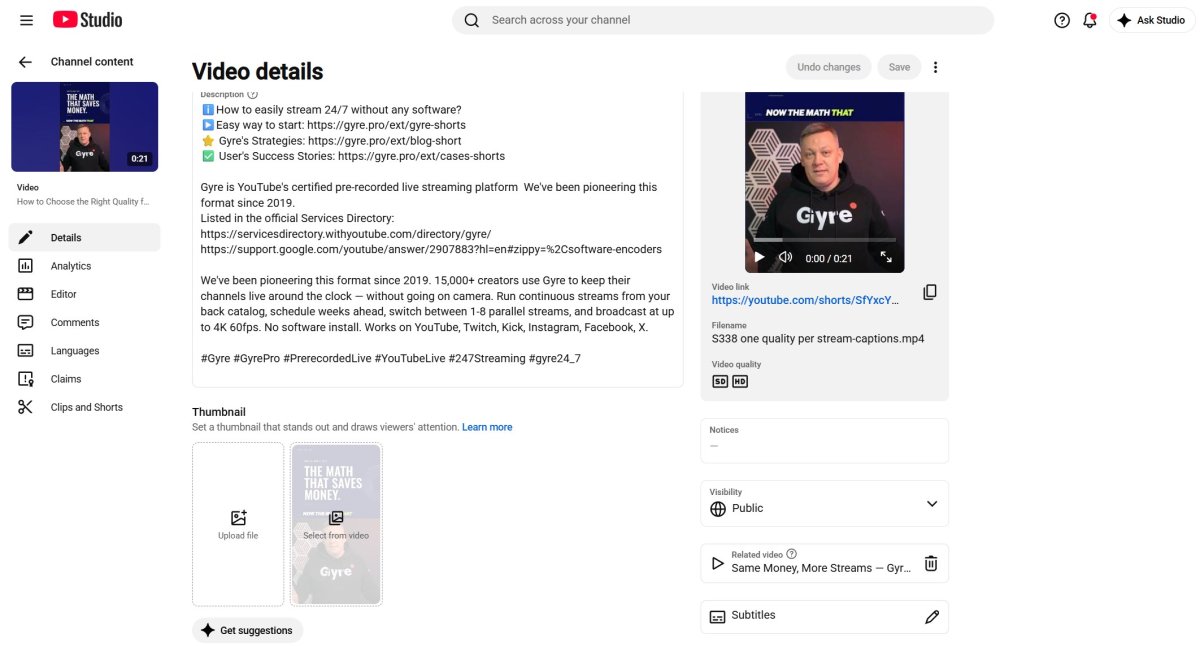
A Shorts thumbnail never appears in the swipe feed, which is why the feature sounded pointless for years. It appears everywhere else: your channel grid, search results, the subscriptions feed, and the home page. For a back catalog of Shorts that still pulls search traffic, that is the difference between a frame grabbed mid-blink and a deliberate cover.
Ask Studio will also generate thumbnail suggestions for long-form videos, reading the transcript and the themes of the video, and you can refine them with follow-up prompts. When you are ready to test packaging properly, the native title and thumbnail A/B testing tool still covers long-form only.
Membership prices switch to recommended rates
After June 2026, YouTube shows recommended membership prices for new members in Studio, calculated from current exchange rates and from signals like where your members are and how they engage with the tier. Existing members keep the price they signed up at. Anyone who cancels and rejoins later pays the current rate, which makes this a churn question as much as a pricing one.
Two mechanics decide how much control you have. You can edit the price of each level once every 12 months, counted separately per level from the day you confirm a change. And if you do nothing after the formal email notice, the recommended prices apply automatically 60 days later, so silence is a decision. The pricing page for channel memberships lists the country-by-country rates.
Three smaller policy updates from the same stretch
These three reached the changelog between June and August 2026 without much coverage, and each one takes a few minutes to check against your own channel.
- Creator responsibility, June 2026. Using YouTube’s features, tools, or services to create or modify content that harms others counts as a serious violation, and it can cost you access to specific features and tools rather than the channel as a whole.
- Violent content, August 2026. YouTube clarified the monetization status of depictions of death inside educational, documentary, and news content, which matters for history, true crime, and news commentary channels that were guessing before.
- AI labels in Promote, August 2026. Promote users running campaigns with AI content can self-disclose through the label setting, and YouTube notes that using it does not by itself guarantee compliance with any specific regulation.
Two September dates worth putting in the calendar
September 9, 2026 is the cutoff for old Studio mobile app builds: versions 24.31.6 and below stop being supported, so update from the Play Store or the App Store if you manage anything from a phone.
The second one is a rename with teeth. Paid product placements become the Branded Content Policy, and the updated paid promotion section in Studio adds granular geographic visibility, including country-level routing, and age gating from 18 to 25 and above. YouTube is also rolling out automated systems that identify undeclared promotional material and may apply the viewer disclosure label on their own. You can still edit that metadata, and you remain responsible for the disclosure being accurate.
What all of this means if you run 24/7 streams
Three of the summer’s changes point at continuous broadcasting specifically, and they pull in different directions. First-frame view counting inflates the public number on a long-running stream, so the stream now looks better than it did in July while earning exactly the same. The concurrency cap pushes the other way: running ten thin streams is becoming a worse strategy than running two strong ones. And the monetization rewrite, for all the noise around it, describes uploaded videos in every one of its examples, not broadcasts of your own catalog.
The strategic read is that a stream built from your own library is safer than it was a year ago, and a network of near-identical streams is riskier. Gyre broadcasts pre-recorded video as a 24/7 live stream on YouTube, Twitch, and Kick from the cloud, which is what makes consolidation cheap: merging two streams into one playlist is a change in the dashboard, not a rebuild of a local setup. If you are planning around a tightening concurrency cap, that flexibility is the thing to optimize for.
Key Takeaways
- Redo any report that crosses August 24, 2026 using engaged views and engaged watch hours as the bridge, and label the split when you show numbers to a brand.
- Watch ten of your own uploads in a row this week. If they blur together, the new policy wording describes your channel, and the fix is variation in substance rather than in packaging.
- Consolidate parallel streams by theme before the concurrency cap reaches you, and plan key structure around three broadcasts per stream key.
- Add 9:16 thumbnails to the Shorts that still earn search and channel-page traffic, starting with the ones published more than six months ago.
- Open Earn → Memberships and either accept the recommended prices or set your own. Doing nothing hands the decision to the 60-day timer.
- Put September 9 and your next sponsored upload on the same checklist: update the Studio app, then walk through the new paid promotion settings once before you need them.
FAQ
What changed on YouTube in summer 2026?
The biggest change is view counting: since August 24, 2026, a view registers from the first frame on long-form video, Shorts, and live streams. Alongside it, YouTube rewrote its monetization policy into three named categories, started capping concurrent live streams, shipped custom Shorts thumbnails on desktop, and moved membership pricing to recommended exchange-rate-based numbers.
Did the new view count change how much I earn?
No. Partner Program earnings are calculated from engaged Shorts views and engaged watch hours, and eligibility from qualified Shorts views and qualified watch hours. The public counter feeds neither number, which is why views can jump while revenue stays flat.
How many live streams can one channel run at the same time?
YouTube has not published a number. It announced in February 2026 that both channels and individual stream keys would be limited in how many concurrent broadcasts they can run, and the rollout has been gradual, so the practical ceiling differs between channels right now.
Can I upload a custom thumbnail for a Short now?
Yes, from YouTube Studio on a computer, with a verified account. Go to Content, open the Shorts tab, pick the Short, and click Upload file below Thumbnail. Use a 9:16 image.
Is AI content banned from monetization?
No. AI-assisted video stays monetizable when it carries your own idea, research, or perspective, and YouTube names AI editing and AI-generated visuals for an original narrative as allowed. What loses monetization is mass production from generic templates and AI personas giving advice on health, legal, financial, or political topics.
What happens to my channel membership prices?
Recommended prices apply to new members only, and your existing members keep paying what they signed up at. You can set custom prices per level once every 12 months, and if you take no action the recommended rates apply automatically 60 days after YouTube’s email notice.