 13 min read

TL;DR
- Authorize your YouTube channel once, and Gyre builds every broadcast on it through the YouTube API, pushing the title, tags, description, and thumbnail across in the same action.
- Authorization takes stream keys out of your hands. Gyre picks up one of your existing keys or generates a new one, then wires it to the broadcast.
- Since January 2026, the YouTube Live Streaming API also switches mid-roll ads on and off per broadcast and configures automatic insertion.
- Automatic monetization on API-created streams still depends on one setting in YouTube Studio. Without it, the stream goes live with monetization off.
- YouTube allows 10 active streams per channel and three per stream key, and both limits apply at once. Plan your key structure around them before you scale continuous streams.
- Manual stream creation stays available for advanced YouTube Studio configurations.
- Channel authorization works on every Gyre plan, including the 7-day free trial. Plans differ in how many streams run at the same time, from 1 to 8.
Gyre creates 24/7 live streams through YouTube channel authorization, using the YouTube API. You grant Gyre access to the channel once, and stream creation stops being a setup task.
What changes in practice is the number of steps. A stream goes live in under a minute, with no key to copy, no dashboard to switch between, and no per-stream trip through YouTube Studio.
Why does channel authorization matter for 24/7 streams?
Channel authorization matters because the manual work scales with the number of broadcasts, and the automated work does not. Creators now run dozens of continuous streams across their channels, and at that count even small repeated actions turn into hours. Authorization removes that repetition.
Gyre creates the live stream on your channel through the API. Titles, descriptions, tags, and thumbnails transfer in the same action: you enter the parameters in one interface and see a fully prepared broadcast on YouTube.
Stream keys stop being something you copy by hand. With manual setup, every broadcast means opening YouTube Studio, copying the stream key and the RTMP server address, and pasting both into an encoder such as OBS Studio or into Gyre. With authorization, you select an existing key or let Gyre create a new one, and the integration binds it to the broadcast. The difference is largest when you manage several channels or a large number of 24/7 streams.
For creators running long-term 24/7 live streams, authorization also lets Gyre manage the broadcast at every stage, including the automatic stop. YouTube exposes the stop behavior through the API itself: a broadcast can end roughly a minute after the encoder stops sending video to the bound stream, which is what keeps an unattended stream from hanging in a live state it can no longer fill.
Monetization on streams created via the YouTube API
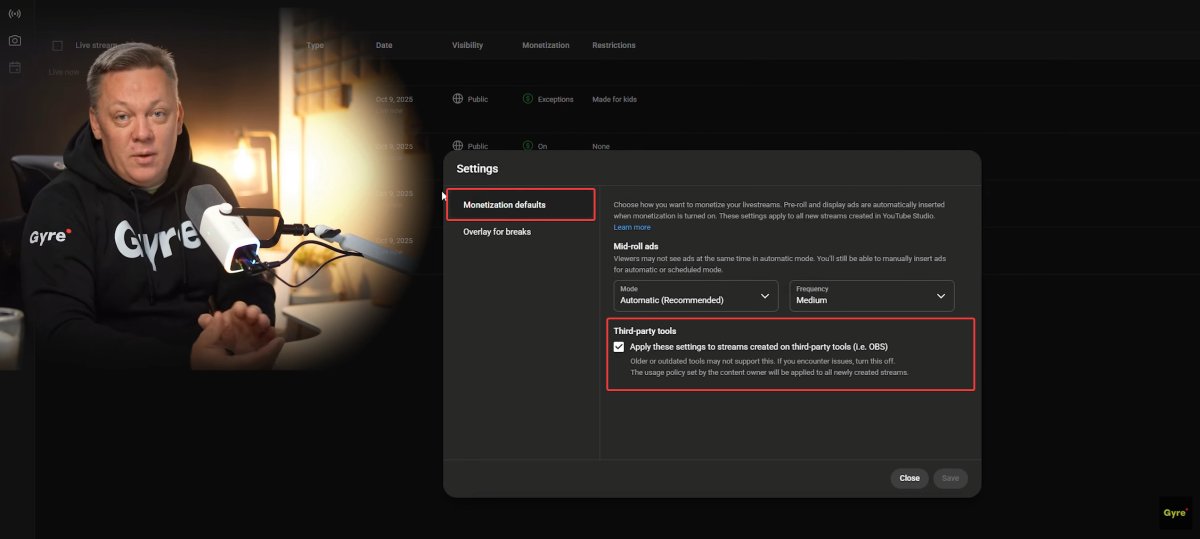
Automatic monetization only works if a specific setting is enabled in YouTube Studio. If this option is turned off, streams created via Gyre (or any third-party tool) will start without monetization.
How to enable it:
- Open YouTube Studio
- Go to Settings → Monetization
- Open Monetization defaults
- Under Third-party tools, enable “Apply these settings to streams created on third-party tools”
Once enabled, all streams created through the YouTube API will launch with monetization already active, without extra checks or lost revenue. Nothing warns you when the setting is off: the stream starts, viewers arrive, and no ads serve until someone notices.
One thing changed on YouTube’s side in 2026. According to the Live Streaming API revision history, in January the API gained direct control over mid-roll ads on a broadcast: an eligible broadcast can have mid-rolls switched on or off, and automatic insertion configured, without anyone opening the Live Control Room. When automatic ads are on, the owner either lets YouTube optimize placement at low, medium, or high frequency, or sets the cuepoint strategy and the interval between breaks manually. A follow-up change in July 2026 made it possible to lift an ad pause by clearing it or setting it to a past timestamp, so a stream that paused ads during a quiet stretch can resume them without being recreated.
Since August 2026, the API also returns a dedicated error when a broadcast isn’t eligible for ads, so a monetization problem shows up while the broadcast is being configured rather than hours into the stream.
Channel-level defaults and API-level control cover different ground, so treat them as two separate checks. The YouTube Studio setting decides whether a stream created outside YouTube inherits your monetization defaults at all. The API fields decide how ads behave on that specific broadcast once it exists.
With monetization in place, every hour a stream stays live adds watch time the channel can earn from.
Manual setup vs API automation: what actually changes
Channel authorization removes four manual steps: creating the broadcast in YouTube Studio, copying the stream key and RTMP address, re-entering the metadata a second time, and confirming the start on YouTube. Both paths end with the same live broadcast on your channel, so the difference is how many objects you move by hand.
| Step | Manual setup | Channel authorization via YouTube API |
|---|---|---|
| Creating the broadcast | You create it in YouTube Studio, then recreate the same parameters in Gyre | Gyre creates it on the channel from the parameters you entered once |
| Stream key | You copy the key and RTMP address from YouTube and paste them into Gyre | Gyre reuses one of your keys or issues a new one and binds it |
| Title, description, tags, thumbnail | Entered twice, in two interfaces | Entered once in Gyre and pushed to YouTube |
| Going live | Start in Gyre, then confirm on YouTube unless auto-start is set | One button starts the stream on both sides at once |
| Stopping | Manual, or auto-stop configured per broadcast in Studio | Handled through the API for the whole life of the broadcast |
| Several channels | Each channel means a separate pass through Studio | Each channel is authorized once, then works the same way |
| Best suited to | Advanced Studio configurations and one-off broadcasts | Continuous streams, repeat launches, and multi-channel work |
How does stream creation work in practice?
The workflow takes four actions: select YouTube as the platform, connect your channel, define the stream parameters, and create the live stream in Gyre. The system generates the broadcast on your channel and prompts you to add videos or a playlist.
Before launch, Gyre checks all file parameters. If any video doesn’t match the first one in the list on resolution, FPS, or audio settings, you’ll see the issue immediately in the interface. There’s no need to test streams manually or troubleshoot after going live.
Gyre runs that check for a concrete technical reason. YouTube treats a stream’s resolution, frame rate, and ingestion type as fixed once the stream is created, and it refuses later attempts to change them. Frame rate mismatches, low video bitrate, and a missing audio track all surface on YouTube’s side as stream health problems rather than clean errors, which is exactly the kind of thing that is hard to diagnose after an audience is already watching.
Once everything is ready, you press one button. The stream begins simultaneously on Gyre and YouTube. Stream status is synced in real time, so you see the broadcast’s current state in Gyre without opening YouTube Studio to check it. You can edit the title, change the playlist, or duplicate the stream for a new launch at any moment.
Watch: set up an automated YouTube stream in under a minute
The demo below shows stream creation through channel authorization from the Gyre side, from choosing YouTube as the platform to the live broadcast.
In short, the flow runs from the platform choice to a live broadcast: authorize the channel once, fill in the stream parameters, add your files, review the file report, and press start. The next section breaks each step down.
To try it on your own channel, connect your channel and create your first automated stream on the 7-day free trial.
How do you connect a YouTube channel to Gyre?
Connecting a channel is a one-time action, repeated per channel.
- Open your Gyre account and start creating a stream. Select YouTube as the platform.
- Choose channel authorization instead of manual key entry, and sign in with the Google account that owns the channel.
- Grant Gyre access to manage live broadcasts on the channel. YouTube requires the request to be authorized by the Google Account that owns the channel, which is what lets Gyre create the broadcast, bind the key, and read the status back.
- Pick the channel. If your Google account manages several, each one is authorized separately.
- Fill in the stream parameters: title, description, tags, thumbnail, and privacy.
- Select an existing stream key or let Gyre create a new one.
- Add your videos or a playlist, then check the file report Gyre returns before launching.
Two prerequisites sit outside Gyre. The channel has to be verified, with live streaming enabled and no live streaming restrictions in the past 90 days, and the third-party monetization setting has to be on if you expect ads from the first minute. The wider setup, from preparing a playlist to picking a plan, is covered in our guide on how to stream a pre-recorded video as live with Gyre.
Manual setup is still available
Manual stream creation remains unchanged. It follows the same stream key and RTMP address flow you would use with OBS Studio or any other encoder, and it’s still useful for creators who need maximum control or work with advanced YouTube Studio configurations.
Channel authorization is becoming the default because it removes the two steps where mistakes usually happen: copying the stream key, and re-entering the same metadata in a second interface.
Scheduling a stream after you create it
After creating a stream, you can immediately add it to the Streams Scheduler. Choose a start time, an end time, or both, set the schedule, and the event appears in your timeline. The scheduler is included in the free trial, Start+, and PRO+; the Start plan doesn’t have it.
In practice, this lets you plan a week of broadcasts in one sitting: create the streams, give each one a start and end time, and leave the dashboard alone until the next batch. The calendar switches between month, week, and day views, the search field finds a specific broadcast by name, and any scheduled event can be edited or removed from the timeline.
Each stream gets its own entry in the scheduler, including streams that send the same playlist to Twitch or Kick. The setup for that case is covered in our guide on how to live stream to multiple platforms at once.
Built-in video converter: every file stream-ready before launch
Gyre’s video converter fixes file problems before they reach YouTube. Every upload is checked twice: once while the file lands in Storage and again in Storage itself, where the “Check” button shows the file’s details. If a file doesn’t meet streaming requirements, Gyre asks you to optimize it before it can join a stream.
This matters more for a 24/7 broadcast than for a one-off stream. YouTube converts a non-optimized file on the fly, and when it can’t convert and deliver at the same time, the broadcast plays in fragments or gets cut off. A playlist that mixes resolutions or bitrates makes this more likely, and that is exactly what you get when a playlist is built from an archive collected over several years.
Optimizing a file takes three clicks: open Storage, open the file’s info menu, and click “Optimize.” The converter panel shows the file’s current parameters next to the expected result. On average, a one-hour video converts in 12–15 minutes, and the file stays locked for streams until conversion finishes.
Conversion uses Vcoins, Gyre’s internal unit for converter time: one Vcoin covers 60 seconds of video. Paid plans include a monthly allowance of 120 Vcoins on Start, 260 on Start+, and 500 on PRO+, while the free trial runs automatic optimization.
Playlists that keep a 24/7 stream watchable
A playlist in Gyre sets what a stream plays and in what order, and the stream starts it again from the top when the last file ends. Playlists are available on the free trial, Start+, and PRO+.
Treat each playlist as a channel within your channel. Files on one topic, without dates or outdated overlays, read as a single broadcast, while a random mix reads as leftovers. Gyre’s setup guide recommends at least one hour of material per playlist, ideally 3–5 hours.
Themed playlists also give each stream its own title, thumbnail, and search intent: “Focus music 24/7,” a cooking marathon, or separate blocks for morning and late-night audiences. Each one becomes a separate entry point into the channel, and longer viewing sessions on a stream add watch time to the channel as a whole.
Because the playlist can be changed on a running stream at any moment, a broadcast that starts losing viewers can get fresh material instead of being rebuilt from scratch. For the wider picture of how this format works on YouTube, see our guide on whether you can stream prerecorded videos as live on YouTube.
Who benefits most from API automation?
Automation pays off in proportion to how often you repeat the same action, so the gain is uneven across channel types. A continuous broadcast is a format built on top of encoder streaming, which means every relaunch repeats the encoder setup.
| Who | Why authorization pays off |
|---|---|
| Creators with several channels | Authorization happens once per channel, and the workflow afterwards is identical everywhere. A broadcast on the fifth channel takes the same clicks as on the first. |
| Agencies and media teams | Stream keys pasted into a group chat are a security problem as much as a workflow one. The credential stays inside the integration, and every operator produces an identically configured stream. |
| Always-on 24/7 channels | Automated creation and stopping turn a relaunch into a duplicate action instead of a rebuild, which matters when a stream restarts weekly. |
| Music, education, evergreen libraries | These channels run many parallel streams from the same source files, so entering metadata once instead of twice per stream compounds fastest. |
| Single-stream creators | Smallest gain. Manual setup costs one afternoon, and the API saves minutes rather than hours. |
How many of those streams run at once depends on the plan: one on the free trial and Start, up to four on Start+, and up to eight on PRO+. The Gyre pricing page shows which plan fits your setup.
What are the YouTube API limits in 2026?
Four YouTube limits decide how far API automation scales: 10 active streams per channel, three broadcasts per stream key, request rate limits, and stream settings that lock once the stream exists. None of them blocks 24/7 streaming, but each one shapes how you structure a large setup.
10 active streams per channel. YouTube Help sets a limit of 10 active streams per channel and 3 per stream key, applied at the same time. When either is reached, the next stream won’t start, whichever tool created it.
Three broadcasts per stream key. A broadcast binds to exactly one stream, while one reusable stream can serve up to three broadcasts. Plan your key structure before you scale, because reworking it later means recreating broadcasts.
Request rate limits. YouTube caps how often one user can create broadcasts, bind them to a stream, and transition them to live. Too many of those calls in a short window return a permission error instead of queueing. On top of that, YouTube limits how many live streams a channel can create in a 24-hour period.
Locked stream settings. Once a stream exists, YouTube fixes its resolution, frame rate, and ingestion protocol for good. Normalize a playlist that mixes formats before launch, not after.
Two 2026 additions push in the opposite direction. Since June 2026, a broadcast can carry geographic availability rules, so regional restrictions no longer require a separate pass in Studio. And since March 2026, gift events appear in the live chat data, which matters for anyone tracking engagement on long-running streams.
What API automation changes for you as a creator
API automation changes five things in day-to-day work:
- fewer manual steps and technical actions;
- faster launches and simpler management;
- automatic monetization;
- more stable 24/7 live streams;
- the same workflow across multiple YouTube channels.
Launching continuous live streams in Gyre works the way the task itself suggests: enter the parameters once, then repeat the launch as often as the channel needs.
Connect your YouTube channel in your Gyre account and run your first automated 24/7 stream on the free trial.
Key Takeaways
- Authorize the channel once and stream creation becomes a repeatable action instead of a setup project. The time saved grows with every launch, which is why the effect is largest on channels that relaunch often.
- Switch on the third-party monetization setting before your first API-created stream, not after. Hours that a stream spends live without monetization are hours you cannot bill retroactively.
- Decide your stream key structure around both YouTube ceilings, 10 active streams per channel and three per key, while you still have a handful of streams. Reorganizing keys later means recreating broadcasts.
- Line up picture and audio settings across a playlist before launch, since YouTube locks those stream parameters the moment the stream exists. Run mismatched files through the converter first.
- Keep manual setup as the exception for the specific Studio configurations the API doesn’t expose, and use duplication rather than fresh builds for everything else.
FAQ
How do I automate a YouTube live stream?
Authorize your channel in a tool that creates broadcasts through the YouTube API, and let it handle the stream key and metadata. In Gyre, that means selecting YouTube, signing in with the Google Account that owns the channel, filling in the stream parameters, adding a playlist, and pressing start. Add the Streams Scheduler if the stream should start and stop at set times.
What does Gyre’s YouTube API automation do?
It moves the whole broadcast lifecycle into Gyre, so you never configure an individual stream in YouTube Studio. Once the channel is authorized, Gyre creates the broadcast on YouTube, moves your metadata onto it, binds the stream key, starts the stream, and reports status back in real time.
Do I still need a stream key if I authorize my channel?
The broadcast still uses one, because YouTube binds every broadcast to a stream key. What changes is that you no longer copy it: Gyre reuses one of your existing keys or creates a new one and binds it for you. You don’t enter the RTMP address anywhere either.
Do I need technical knowledge to use channel authorization?
No. You sign in with the Google Account that owns the channel, grant access, and fill in the same stream parameters you would enter anywhere else, while Gyre handles the API calls, the key binding, and the file checks. The one setting you still change yourself is the third-party monetization toggle in YouTube Studio.
Will streams created through the API be monetized automatically?
Only if monetization defaults are set to apply to streams created on third-party tools. With that setting off, a stream created by any external service starts with monetization disabled. Since January 2026, the API itself can also set mid-roll behavior on an eligible broadcast, letting YouTube place the breaks at one of three frequency levels.
Can I run a 24/7 YouTube live stream without keeping my computer on?
Yes. Your files sit in Gyre Storage, and the stream goes to YouTube from Gyre’s servers rather than from your computer or home connection. You can switch the computer off, and the broadcast keeps running.
Is this feature included in the free Gyre plan?
Channel authorization is part of how Gyre connects to YouTube, so the 7-day free trial supports it too. The trial covers one Full HD stream and 20 GB of storage for up to 15 files, with a Gyre watermark on the broadcast. As of September 2026, paid plans run from $49 to $169 per month; current figures are on the Gyre pricing page.
Does this work for multiple YouTube channels?
Yes, and this is where it saves the most time. Every Gyre plan allows an unlimited number of connected channels, so agencies and multi-channel creators authorize each channel once and then create streams the same way everywhere. What varies by plan is how many streams run simultaneously: one on the trial and Start, four on Start+, and eight on PRO+.