15 min read

TL;DR
- VidSummit 2026 ran September 29 to October 1 at the Irving Convention Center in the Dallas area. Replays of 100+ sessions are on VidSummit TV. Streamer move: watch the live-focused sessions first, not the celebrity keynotes.
- The core theme was ownership: creators building businesses and assets that outlast the feed. Streamer move: treat your VOD archive as inventory that can keep earning on a 24/7 stream.
- Live had its own stage. Twitch CEO Dan Clancy and Jshock ran a session on why creators are going live. Streamer move: make live part of your plan, not an add-on.
- Memberships need real value. Hammer Media grew its membership by adding perks, then cut the stream format that wasn’t pulling its weight. Streamer move: audit every members-only stream against its numbers.
- YouTube is a TV-first platform now. Editors who spoke at VidSummit say they cut for the living room. Streamer move: build long, lean-back blocks that read well on a big screen.
- AI scales the mechanics, not the voice. Sessions paired AI clipping with a talk on what AI can’t replace. Streamer move: automate clips and chapters, keep the hosting human.
VidSummit 2026 at a glance
VidSummit is a business conference for video creators, founded by Derral Eves in 2014 and co-owned by Eves, MrBeast, and Shonduras. Fans and sales pitches stay out of the room, so speakers talk openly about what works. The 13th edition ran September 29 to October 1, 2026, at the Irving Convention Center in Irving, Texas.
The lineup paired platform leaders with working creators, including Twitch CEO Dan Clancy, Uscreen CEO Allison Yazdian, Codie Sanchez, Caleb Hammer, Jenny Hoyos, and Mark Manson. According to VidSummit TV, the official replay platform, the event draws 3,500+ operators each year: creators, editors, managers, and agency teams, not fans. A single direction ran through the whole program: moving from creator to business owner, with audiences and assets you actually own.
That is a step further than last year. In our VidSummit 2025 recap, the headline was systems over viral spikes. In 2026, the question moved from how to keep a channel running to who owns what the channel builds.
Already thinking about next year? The next edition is set for September 28 to 30, 2027.
The big theme: from creator to business owner, and where live fits in
Of all the VidSummit 2026 key takeaways, ownership came up most. It also sums up the creator economy trends 2026 has been building toward: audience ownership, diversified revenue, and assets that outlive a single upload. Independent data backs this up.
In The Influencer Marketing Factory’s 2026 Creator Economy Report, a survey of 1,000 U.S. creators, ad revenue made up 21.6% of creator income, while product, merch, and affiliate sales together added 21.2%. Linktree CEO Alex Zaccaria, quoted in the report, said 2026 is “cementing a shift toward ownership, diversification, and direct, authentic relationships with audiences.”
On stage, the keynote “Creator or CEO? Building Businesses Off-Platform” with Codie Sanchez and Billy Parks framed the gap between growing an audience and building something that lasts. The rest of the schedule kept circling back to it, from creators turning YouTube projects into films to teams moving their best fans onto platforms they control. The prize is no longer a record view count but an asset you still own after the algorithm moves on.
For streamers, the translation is direct: a live channel can be one of those assets, as long as it doesn’t depend on you being on camera every hour it earns.
You probably own hundreds of hours of past streams, podcasts, tutorials, or music sets that sit idle after their first week. Run them as a scheduled 24/7 stream and that archive starts acting like a small media property: it holds a time slot and collects watch time, including from viewers in time zones you never stream for.
That also changes what you measure. A hobby stream lives on peak concurrent viewers. A channel run as a business tracks watch hours per week, returning viewers, and revenue per hour on air.
Community is the moat, and live is where community happens
Live got its own spotlight in Dallas. Twitch CEO Dan Clancy and creator Jshock led “Why Creators Are Going Live on Twitch: And How to Get Started”. Putting the head of a live platform on a creator business stage is a signal in itself.
The clearest community lesson came from the memberships panel. Caleb Hammer and Robert Kaliati of Hammer Media sat down with Uscreen CEO Allison Yazdian to explain how they built Hammer Elite, one of the largest creator memberships on YouTube. Hammer said the first version, a plain “support the creator” tier on Patreon, barely moved for months. It started growing only after the team moved it to YouTube and added real reasons to pay: behind-the-scenes shows and Mario Kart streams.
The part streamers should underline: the team later reviewed median views across every members-only show and scrapped the Mario Kart streams for not delivering value. Hammer’s rule is that asking for money only feels wrong when you’re asking for value you’re not delivering.
Hammer Elite also shows the ownership theme in practice. In June 2026, the team launched a dedicated Hammer Elite app on Uscreen and kept YouTube Memberships running alongside it. YouTube stays the front door where fans find the show, and the app holds the deeper library the team controls.
In live terms:
- Give members a reason to show up live. A members-only Q&A or a vote on the next topic beats a generic badge.
- Keep a fixed stream schedule. Regular slots train your community to come back, which is the simplest form of community building on live. Announce each slot a day ahead with a YouTube Community tab post.
- Protect the chat. A community only feels like a moat when it’s safe. Set up filters and moderators before you scale, using our guide on handling trolls, spam, and negative comments on live streams.
An always-on replay stream from your archive supports all of this between live sessions: new viewers always find the channel live, and you step in personally for scheduled shows and Q&As.
Watch time, long-form and TV screens: what it means for streamers
The editors on the VidSummit panel “Beyond the Timeline” described the same shift in a pre-event Q&A with Tubefilter. Rachel Kisela, former lead editor at MrBeast, said she now edits with TV in mind rather than phone screens, and that the longer videos she cuts for clients are performing well. MKBHD’s lead editor Mariah Zenk flagged YouTube’s shift toward “engaged views” as a change that could reshape creator businesses.
The platform data points the same way, and it’s the clearest of the live streaming trends 2026 has produced. YouTube says that in August 2026, more than 600 million logged-in viewers watched live content each day on average, archives included. The Streamlabs and Hatchet Q2 2026 report puts YouTube Live at 12.97 billion hours watched, up 18% year over year and 60.3% of all tracked live watch time. The report now tracks YouTube Live as its own category because IRL talk and variety content take a growing share of live viewing, not gaming.
A detail buried in the same report deserves more attention than the headline: the number of channels streaming on YouTube Live fell 19.7% quarter over quarter while hours watched kept growing. Viewing is concentrating in fewer channels, at roughly 308 viewers per channel. Channels that stay on air hold that audience; channels that go dark for weeks hand it to someone else. For the wider market picture, our roundup of live streaming statistics for 2026 covers platform shares and viewer habits.
Our read for streamers: YouTube live streaming in 2026 is increasingly a connected TV experience, and long, lean-back live content fits how people now watch. A 24/7 music, ambient, talk, or tutorial stream can stay on the living room TV for hours. Consistency beats one-off spikes, because an always-on stream keeps collecting watch time in quiet weeks too.
One case isn’t a trend, but it shows what’s possible. On the entertainment channel YEES, Gyre’s 24/7 streams accounted for 79% of watch time over six months, and the average stream view lasted 8:13 versus 4:56 for regular videos. Here’s the full YEES case study.
Monetizing live beyond AdSense
Revenue diversity ran through the schedule, from “From One-Off Sponsorships to Media Empire” to “Cashing In on Facebook”. A week earlier, at Made on YouTube, YouTube announced new live revenue tools. Live showdown lets co-hosts compete for viewer chats, gifts, and Super Chats, and it arrives in 2027, according to the YouTube Official Blog.
Two more updates from the same announcement matter for anyone who streams. Watch With is expanding to eligible long-form videos, so you can react live to a video and keep the live ad revenue and fan funding your stream earns, while the original creator gets attribution and view credit. And from early 2027, co-host matchmaking will let you pair up with creators who are live at that moment. The main tactics translate to streams like this.
| Tactic | How to apply it on your streams |
|---|---|
| Super Chat and Super Stickers | Announce them at the start of each live session and thank senders by name. Our Super Chat and Super Stickers guide covers eligibility and tiers. |
| Channel memberships | Tie perks to live moments: members-only streams, early premieres, polls on the next topic. Review each perk’s performance monthly. |
| Sponsored segments | Sell a recurring slot in a scheduled show, not a one-off mention. Recurring slots are easier to price and report on. |
| Affiliate links | Add relevant links to the description of a 24/7 stream. They keep working as long as the stream stays live. |
| Your own products | Use live Q&As to test demand for a course, merch line, or paid community before you build it. |
One caution: VidSummit covered Facebook monetization, but the same Streamlabs report shows Facebook Gaming live watch time down 64.8% year over year in Q2. Facebook’s creator push and its gaming live audience are different markets.
AI in the live workflow: what creators actually use
AI showed up in two complementary forms. The workshop “One Video. A Million Clips. A Billion Data Points.” with Mick Feldman and Richard Ahn covered turning one video into clips, data, and wider reach. Elsewhere, Aprilynne Alter, Ryan Walker, and Chuck Keith led “What AI Can’t Replace: Building a YouTube Channel People Trust”.
For a live channel, the split is simple. Let AI handle the repetitive work around the stream: cutting Shorts from long broadcasts, generating chapters for VODs, flagging spam in chat, and drafting titles and descriptions in other languages. YouTube is also piloting Live auto dubbing in early 2027, which matters because more than 40% of live watch time already comes from viewers outside a creator’s home country.
What stays human is the part viewers come for: your voice, your judgment about what goes into a 24/7 playlist, and how you show up in chat. If you want a starting point, our overview of AI video tools for live streaming lists practical options.
Standout sessions worth watching if you stream
With 100+ replays, these VidSummit 2026 highlights are the best place for a streamer to start. Descriptions come from the official program and session coverage, so treat the VidSummit 2026 speakers’ insights below as a guide to what to watch, not a transcript.
Why creators are going live on Twitch (Dan Clancy, Jshock)
A platform CEO and a working streamer on why live is worth it. It’s the live-first view most YouTube-centric sessions skip.
Hammer Media’s membership playbook (Caleb Hammer, Robert Kaliati, Allison Yazdian)
How a stalled Patreon tier became one of the largest memberships on YouTube. Watch it if members-only streams are part of your plan.
The future of YouTube and the new golden era for creators (Roberto Blake)
A look at where the platform is heading. Watch Roberto Blake’s session for context on YouTube’s move to the living-room screen and why long-form and live matter more each year.
Creator longevity: still doing this in 20 years (Mark Manson)
Streaming burns people out fast. Mark Manson’s talk is about building a creator career you can sustain.
One video. A million clips. A billion data points. (Mick Feldman, Richard Ahn)
A hands-on repurposing workshop. Apply it to your longest broadcasts first.
Your 30-day action plan after VidSummit
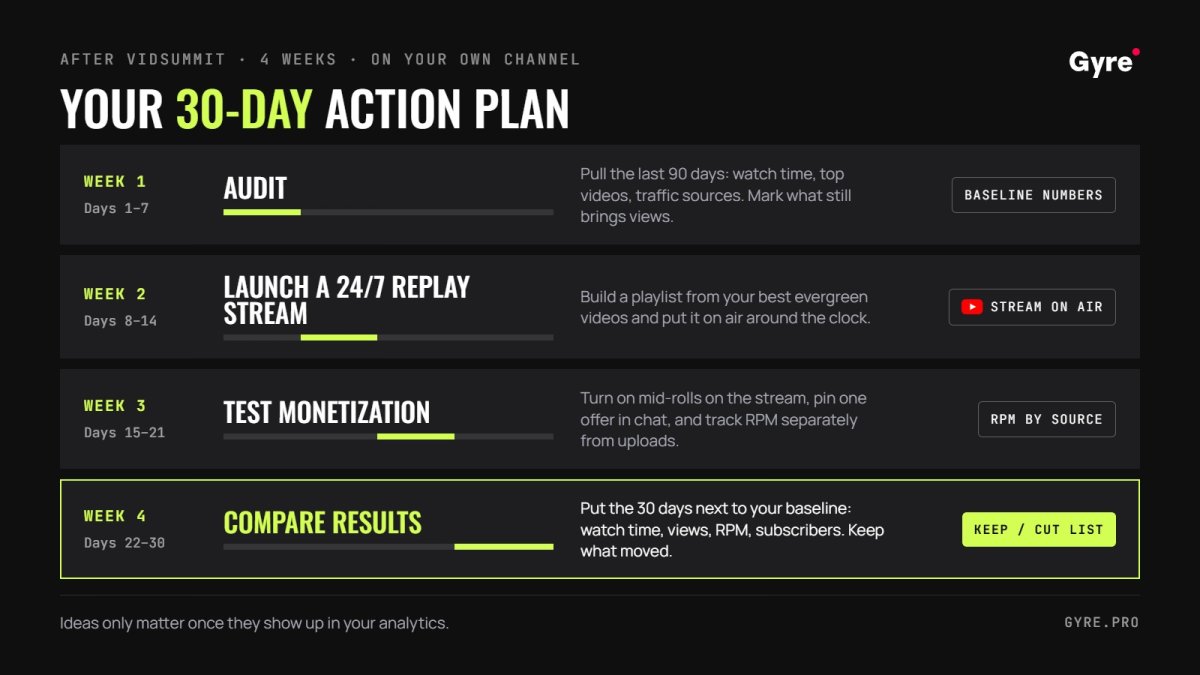
Ideas only matter once they show up in your analytics. If you’ve been wondering how to grow a live channel on YouTube after VidSummit, this four-week plan tests the biggest ideas on your own channel.
| Week | What to do | Metric to watch |
|---|---|---|
| Week 1 | Audit your live metrics and schedule in YouTube Studio. Pick your 20 strongest past streams or videos by average view duration. | Baseline watch time, concurrent viewers, subscribers from live |
| Week 2 | Launch a 24/7 stream from your best VODs with Gyre. Title it clearly as a replay or best of, so viewers know what they’re watching. | Watch hours per day from the 24/7 stream |
| Week 3 | Test one new monetization or chat format: a members-only Q&A, a pinned Super Chat goal, or a recurring sponsor slot. | Revenue per live hour, chat messages per stream |
| Week 4 | Compare watch time, concurrent viewers, and subscribers from live against week 1. Keep what worked and cut what didn’t. | Change vs. baseline |
For the week 1 audit, our YouTube analytics guide explains which retention and traffic reports to open first. Week 2 is where most creators stall, so keep it simple.
Upload the videos, build a playlist, set a schedule, and let the stream run from the cloud without your computer. Our step-by-step guide shows how to stream a pre-recorded video with Gyre, and you can pull older uploads back into rotation with these tips on reviving old YouTube videos. Once the 24/7 stream has an audience, use it to launch new uploads too: here’s how to redirect viewers from a stream to a new video.
Put your VidSummit takeaways to work
The fastest way to test what you learned is to give your best content more hours on air. Gyre runs 24/7 live streams of your pre-recorded videos from the cloud, so no computer needs to stay on. Schedule playlists, run separate streams on several platforms at once, and stream in HD or 4K. Compare Gyre plans when you’re ready to scale.
Start with your best VODs: try Gyre free for 7 days.
Key Takeaways
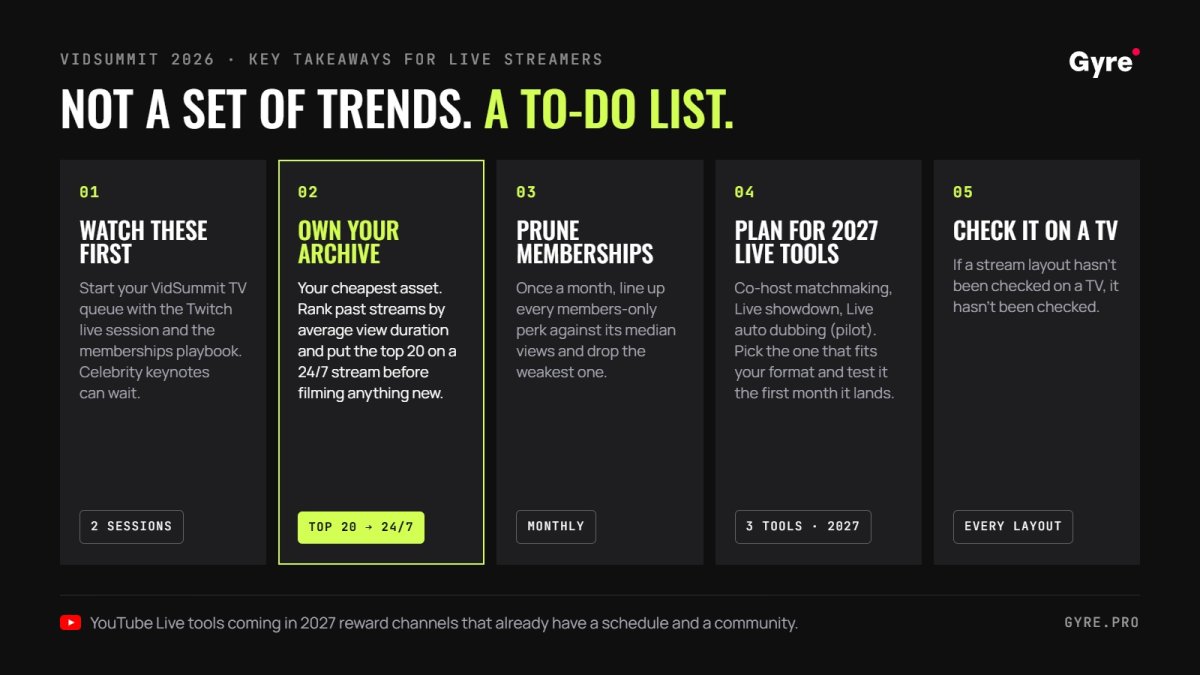
VidSummit 2026 handed streamers a to-do list more than a set of trends. The YouTube Live tools arriving in 2027 will reward channels that already have a schedule and a community, so the work worth doing now is the unglamorous kind.
- Start your VidSummit TV queue with the Twitch live session and the memberships playbook, and save the celebrity keynotes for later.
- Your archive is the cheapest asset you have. Rank past streams by average view duration and put the top 20 on a 24/7 stream before you film anything new.
- Once a month, line up every members-only perk against its median views and drop the weakest one, the way Hammer Media dropped its Mario Kart streams.
- Co-host matchmaking, Live showdown, and Live auto dubbing all arrive in 2027, the dubbing as a pilot. Note which of them fits your format and plan a test for the first month it reaches your channel.
- If a stream layout hasn’t been checked on a TV, it hasn’t been checked.
FAQ
What happened at VidSummit 2026?
VidSummit 2026 was a three-day creator business conference held September 29 to October 1 at the Irving Convention Center near Dallas, covering memberships, live streaming, AI, editing, and monetization.
What were the key takeaways from VidSummit 2026?
Ownership was the main theme of the event. Other recurring topics were value-driven memberships, TV-first viewing, AI-assisted repurposing, and live as a community tool.
Who spoke at VidSummit 2026?
Speakers included Twitch CEO Dan Clancy, Jshock, Codie Sanchez, Billy Parks, Caleb Hammer, Allison Yazdian, Jenny Hoyos, Mark Manson, Sean Cannell, Roberto Blake, and founder Derral Eves, among many others.
Is live streaming still worth it on YouTube in 2026?
Yes. YouTube reports 600M+ logged-in viewers watching live content daily, and third-party data shows YouTube Live watch time up 18% year over year in Q2 2026.
Where can I watch VidSummit 2026 sessions?
Session recordings from VidSummit 2026 are published on VidSummit TV, the event’s official on-demand platform, with apps for mobile, desktop, and TV.
When is VidSummit 2027?
VidSummit 2027 is scheduled for September 28 to 30, 2027, in the Dallas area.
How can I apply VidSummit insights to my live stream?
Start with a metrics audit, launch a clearly labeled 24/7 replay stream from your best content, test one new monetization format, and compare results after 30 days.